
Purpose
The goal is to verify that the payment flow, customer experience and transaction information are correctly implemented.
Before you start
Complete the Pay.POS: Getting Started & Choosing the Right Integration checklist before validating the Inject integration.
Minimum requirements
Before starting validation, verify that the following requirements are met.
Integration ownership
The integration must contain sufficient information to identify the application owner.
Required:
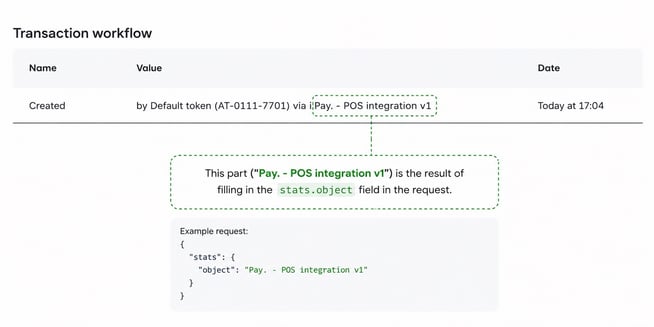
- ☐ stats.object is populated.
- ☐ The value identifies the application or integration owner.
- ☐ The value is consistent across transactions.
Why this is important
The stats.object value allows Pay. to identify the responsible integration for monitoring, support and troubleshooting.
Transaction initiation
Verify that the merchant application correctly starts a Pay.POS payment.
Required:
- ☐ The merchant application can initiate a payment.
- ☐ The correct payment amount is transferred.
- ☐ The correct currency is transferred.
- ☐ A unique transaction reference is used.
- ☐ The configured return URL is available.
- ☐ PAY.POS opens automatically after the payment is initiated.
PAY.POS Inject allows an application to send a transaction to Pay.POS, after which Pay.POS handles the payment flow.
Payment flow validation
Verify the complete customer payment flow.
Successful payment
- ☐ Customer can complete a contactless payment.
- ☐ Payment is successfully completed.
- ☐ The merchant application receives the successful payment result.
- ☐ The transaction status matches the result shown in PAY.POS.
Failed payment
- ☐ Failed payments return the correct result.
- ☐ The merchant application handles failed payments correctly.
- ☐ Customer can retry the payment if required.
Cancelled payment
- ☐ Customer can cancel the payment.
- ☐ Cancellation returns the correct status.
- ☐ No duplicate transaction is created.
Return handling
After the payment is completed, Pay..POS returns the result to the original application using the configured return flow.
Verify:
- ☐ The merchant application receives the return.
- ☐ The correct transaction status is processed.
- ☐ The user is returned to the correct screen.
- ☐ The application does not create duplicate payments after receiving a result.
Customer experience
Although Pay.POS handles the payment screen, validate the overall user journey.
Required:
- ☐ Customer clearly understands when they need to present their card or mobile device.
- ☐ Customer receives feedback during payment processing.
- ☐ Customer receives a clear success or failure result.
- ☐ The cashier knows what action to take after each result.
Device and connectivity scenarios
Verify:
- ☐ Payment works with a supported device.
- ☐ NFC is enabled.
- ☐ Temporary connectivity interruptions are handled correctly.
- ☐ PAY.POS unavailable scenario is handled correctly.
- ☐ Application restart scenario is tested.
Receipts
Providing a receipt after a successful payment is mandatory. Ensure that the receipt flow is correctly implemented and tested before going live.
Required:
- ☐ Receipt option is available after successful payment.
- ☐ Receipt information is correct.
- ☐ Customer receives the receipt successfully.
Refunds
If refunds are enabled:
- ☐ Refunds can be initiated through the Inject flow.
- ☐ Refund amount is correct.
- ☐ Refund result is handled correctly.
- ☐ Refund appears correctly in Pay. Portal.
Additional configuration
Validate optional configuration where applicable.
Alternative sales location
If payments are initiated for another sales location:
- ☐ Correct sales location is used.
- ☐ Required credentials/configuration are available.
Language settings
If a specific PAY.POS language is required:
- ☐ The configured language is displayed correctly.
Validate the MAT flow:
- ☐ The device can complete a MAT transaction when there is no active internet connection.
- ☐ The merchant application receives the correct transaction result.
- ☐ The transaction is not incorrectly marked as failed when it is stored for later processing.
- ☐ The transaction is successfully processed once connectivity is restored.
- ☐ The final transaction status is correctly reflected in Pay. Portal.
Important
MAT transactions are an exception flow and should be tested separately from regular online payments. Make sure the merchant understands that the final processing of a MAT transaction can happen after the customer has left the payment location.
Application certification
Important
Application certification by Pay. is mandatory before going live.
The certification process verifies that the integration meets Pay. requirements and that transaction handling works correctly.
Test evidence
Collect the following evidence during validation:
- ☐ Successful transaction reference.
- ☐ Failed transaction reference.
- ☐ Cancelled transaction reference.
- ☐ stats.object value.
- ☐ Device information.
- ☐ Screenshots of the payment flow.
Go-live checklist
Before activating the Inject integration:
- ☐ Transaction initiation tested.
- ☐ Successful payment tested.
- ☐ Failed payment tested.
- ☐ Cancelled payment tested.
- ☐ Return handling verified.
- ☐ Receipt flow verified.
- ☐ Certification completed.
- ☐ Production configuration verified.