The funds managed on your behalf by Stichting PAY. are paid out to your settlement account (clearing account). Before an account can be used for payouts, it must first be added and verified.
Requirements for a Settlement Account
The settlement account must meet the following requirements:
- The account number must be an IBAN within the SEPA area.
- The account must be registered in the name of your company or registered trade name.
- The account must be a business bank account.
Can I Use a Personal Bank Account?
No. PAY. does not accept personal bank accounts as settlement accounts. If you are currently using a personal account for business purposes, please contact your bank to open a business account. More information can be found in our blog: https://www.pay.nl/blog/waarom-altijd-een-zakelijke-bankrekening
Adding a Settlement Account
In the Admin Panel, go to: Merchant > Company Details > Bank Details / Settlement Accounts Here, you can add and verify a new account. This can be done in two ways.

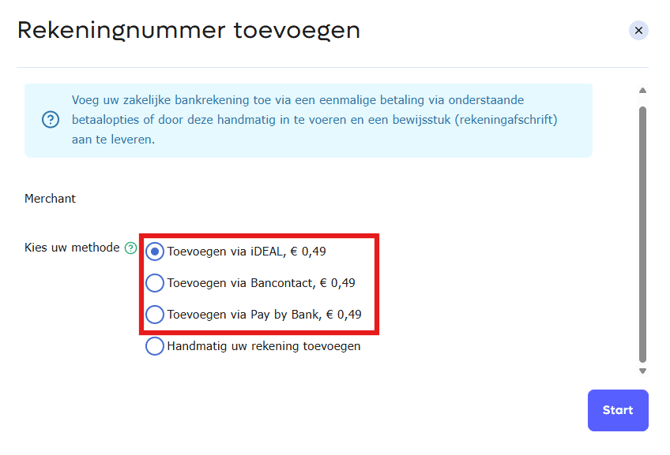
1. Verification via iDEAL (or Another Payment Method)
The easiest method is through a one-time payment using iDEAL, Bancontact, or Pay by Bank. PAY. automatically receives the IBAN number and the account holder's name of the bank account used for the payment. Based on this information, the account is immediately checked and verified. Once processed, the verification amount is added to your balance and can be paid out again if desired.
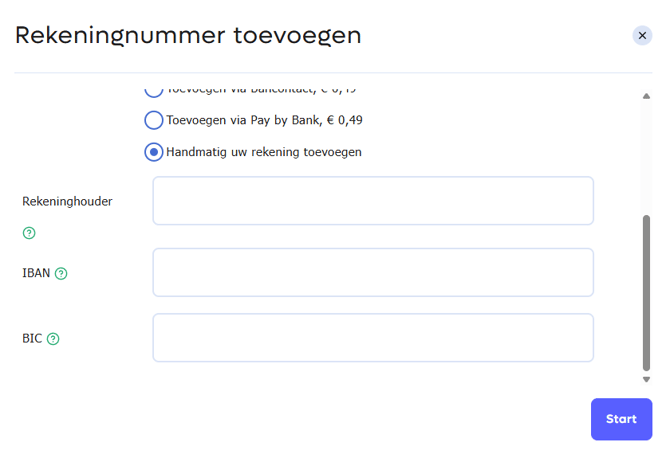
2. Manual Verification via Bank Statement
You can also add an account manually by entering the account details and uploading a recent bank statement. We will then verify that:
- the IBAN matches the specified account;
- the account holder matches your company name or trade name;
- the account meets the requirements for payouts;
- the statement is no older than 6 months.
After approval, the account can be used as a settlement account.
Multiple Settlement Accounts
Would you like to distribute payouts across multiple bank accounts? You can use the Multiple Settlement Accounts feature included in the Business package. After activation, you can add multiple settlement accounts. Each new account must be verified separately.
If this feature is not activated, any newly added settlement account will automatically replace the existing settlement account.
Multi-Currency Settlement Accounts
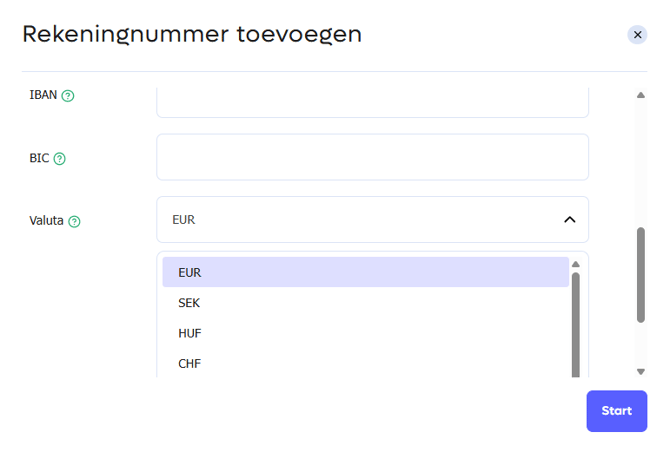
Would you like to receive payouts in a currency other than EUR? You can make use of multi-currency settlement.
Before you can add an account in another currency, that currency must first be activated for your account. To request activation, send an email to support@pay.nl specifying the currency you would like to use. Click here for an article outlining the currencies that PAY. offers for multi-currency settlement.
Once activated, you can add the corresponding settlement account through the Admin Panel. The same verification procedure applies to each multi-currency settlement account as to a regular settlement account.
Please note: Adding multi-currency settlement accounts is only available within the Business package. In addition, only currencies activated by PAY. for your account can be added.
Option when selecting the currency for the account: