
Clearing and Invoice Settings
The clearing and invoice settings determine how payouts and invoicing are processed within PAY. These settings affect when funds are paid out and how transactions and fees are grouped.
Clearing PeriodThe clearing period determines how transactions are grouped for payout.
Possible values:
- Day (DAY): a clearing is created daily.
- Week (WEEK): transactions are grouped per week.
- Month (MONTH): transactions are grouped per month (default setting).
Please note: if you choose weekly clearing and a week spans two calendar months, two separate clearings may be created.
Clearing Frequency
The clearing frequency determines how often PAY. checks whether available funds can be paid out.
Possible values:
- Daily (business days) (DAY)
- Weekly (Monday) (WEEK)
- Monthly (first business day of the month) (MONTH)
- Manual (MANUAL)
With a manual setting, payouts are not executed automatically. You must trigger payouts yourself through the API.
For technical implementations via the API, please refer to the developer documentation: https://developer.pay.nl/docs/clearing-and-invoice-settings
Clearing Moment
The clearing moment determines when released revenue is actually paid out.
Direct (DIRECT)
Revenue is paid out as soon as it becomes available according to the agreed payout conditions.
Collect (COLLECT)
Revenue is only paid out when the entire clearing period has been released.
The payout speed may depend on factors such as:
- The relationship with PAY.
- Transaction history.
- The payment methods used.
- The number of chargebacks and disputes.
- The agreed service level.
Factuurperiode
Bepaalt hoe transactiekosten en overige kosten worden gegroepeerd op de factuur.
Mogelijke waarden:
- Week (WEEK)
- Maand (MONTH)
Invoice Frequency
Determines how often an invoice is sent or settled.
Possible values:
- Week (WEEK)
- Month (MONTH)
Separate Payout per Clearing
This setting determines whether each clearing is processed as a separate payout to the bank account.
Split by Revenue Group
When this setting is enabled, a separate clearing is created for each revenue group.
MT940 Settings
For organizations that use MT940 bank files, additional settings can be configured, such as:
- Adjusting the bank account number in the MT940 file.
- Adjusting the file headers.
Available header formats:
- STANDARD
- CUSTOM
- TWINFIELD
With CUSTOM, the predefined custom headers are used.
Manage Settings via the API
All settings described above can be managed through the PAY. API. The current configuration of a merchant or submerchant can also be retrieved through the API.
For technical details, example requests, and available API endpoints, please refer to the official developer documentation: https://developer.pay.nl/docs/clearing-and-invoice-settings
Manage Settings in the PAY. Portal
The clearing and invoice settings can also be managed through the PAY. portal.
- Go to Merchant Management.
- Open the desired merchant (wrench icon).
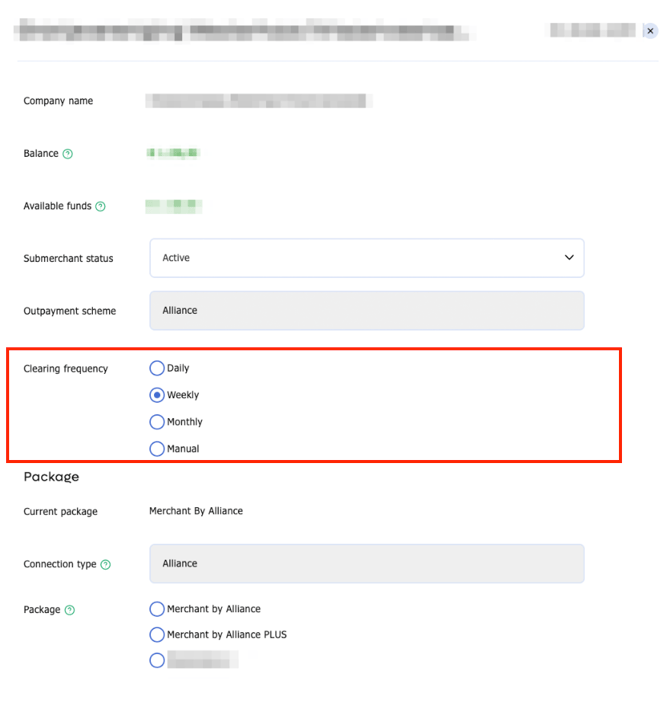
-
For other settings, you will need to impersonate your customer using the home icon.
- Navigate to Merchant > Invoices (Clearing).
- Open the settings to adjust the clearing and invoicing preferences.
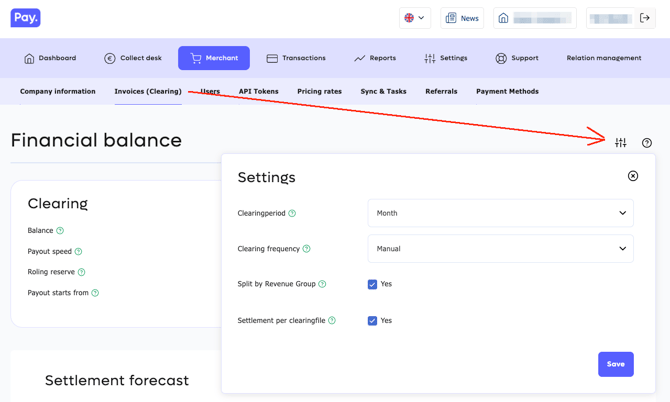
Please note: which settings are visible and editable depends on the permissions assigned to your account.
Frequently Asked Questions
What is the difference between a clearing period and a clearing frequency?
The clearing period determines how transactions are grouped. The clearing frequency determines how often PAY. checks and executes payouts.
When will I receive my payout?
This depends on the configured clearing moment, the payout conditions of the payment methods used, and the agreements within your PAY. account.
Can I perform payouts manually?
Yes. When the clearing frequency is set to MANUAL, payouts are not executed automatically and must be triggered manually through the API.
Why can't I see certain settings?
The availability of settings depends on the permissions linked to your account.