
This checklist helps Product Owners, QA teams and integration partners validate a Pay. e-commerce integration before requesting certification.
Purpose
The goal is to verify that the integration correctly handles the complete Pay. payment lifecycle:
Configure → Create order → Process payment → Receive status → Update merchant order
The merchant platform must always reflect the actual payment status within Pay.
Please note: this checklist is intended as a validation and certification tool. For technical implementation questions, the Developer Documentation should always be considered the leading source.
1. Before you start
Before starting certification:
-
☐ A test sales location and valid API credentials are available.
-
☐ The integration can successfully communicate with the Pay. API.
-
☐ At least one payment method is active and available for testing.
-
☐ Transactions and merchant orders can be inspected during testing.
2. Integration configuration
Authentication & sales location
-
☐ API authentication works correctly and credentials are stored securely and are not exposed to the shopper/browser.
-
☐ The sales location is configurable and the correct SL-code is used when creating orders.
-
☐ Test and production configuration can be separated so merchants can safely switch environments/credentials without code changes.
Integration identification
- ☐ The integration identifies itself correctly using stats.object with the integration/application name and version where applicable.
Why this is important
Correct identification allows Pay. to recognise which integration generated a transaction and assists with monitoring, support and troubleshooting.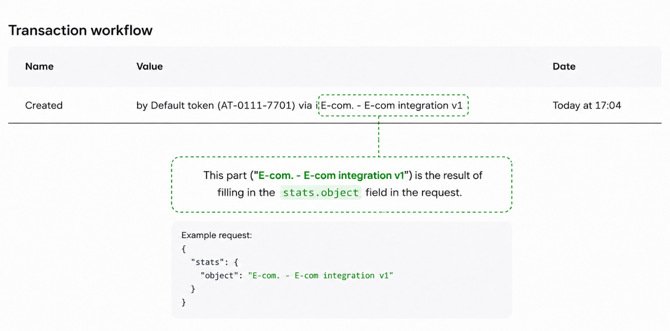
3. Checkout configuration
Complete this section when the integration builds its own payment-method selection or checkout.
Payment methods
-
☐ Available payment methods are based on the configured sales location rather than being permanently hard-coded.
Changes to activated payment methods should be reflected without requiring a new integration release.
-
☐ Single and grouped checkout options are handled correctly, including the payment method or checkout option selected by the shopper.
-
☐ Payment method names and available Pay. icons/logos are displayed correctly.
-
Payment method configuration
- ☐ Payment method amount restrictions are respected, including the returned minimum and maximum amount.
A payment method that cannot process the order amount should not be presented as a valid option, or the shopper should receive clear feedback.
-
☐ Required fields returned for a checkout option are collected and sent correctly when starting the payment.
-
☐ Payment-method-specific options are handled when applicable, using the configuration returned by Pay.
Checkout presentation
-
☐ The checkout sequence returned by Pay. is respected where applicable, including primary/secondary and country-specific sequences.
- ☐ Translations are used appropriately when the integration supports multiple checkout languages.
4. Order creationPayment request
-
☐ An order can be successfully created through the Pay. API using the configured sales location.
-
☐ The amount and currency match the merchant order and the amount is sent using the expected API format.
-
☐ The correct payment method or checkout option is submitted when the shopper has selected one.
-
☐ The shopper is redirected using the payment/checkout URL returned by Pay.
Merchant order information
-
☐ Every Pay. order contains a meaningful merchant reference that can be related back to the corresponding order in the merchant platform.
-
☐ A meaningful order description is provided.
-
☐ Relevant customer and order information is provided where available, such as customer details, billing/shipping address and basket information.
The integration should use actual merchant data where available rather than static placeholder information.
5. Payment & status handling
The Pay. payment status must determine the status of the merchant order.
The customer's browser return alone must never be considered proof of a successful payment.
Status processing
Verify that the integration correctly handles the statuses relevant to its supported payment methods:
-
☐ Successful payments result in the correct paid/processing merchant order status.
-
☐ Pending payments remain pending and do not trigger fulfilment until a final successful status is received.
-
☐ Cancelled, expired, denied and failed payments do not result in a paid merchant order.
-
☐ Authorised payments are handled separately from paid/captured payments when authorisation and capture are supported.
-
☐ Verification or other intermediate statuses do not incorrectly result in a paid merchant order.
-
☐ Later status changes are processed correctly, so an order can move from an intermediate state to its final state.
Customer return
-
☐ The shopper is returned to the merchant environment correctly after completing or leaving the payment flow.
-
☐ The shopper receives appropriate feedback for successful, pending, cancelled or failed payments.
-
☐ Another payment attempt can be made safely where appropriate without incorrectly duplicating the merchant order.
6. Exchange handling
Exchange calls ensure that payment status changes reach the merchant platform independently of the shopper's browser.
Exchange endpoint
-
☐ A valid and publicly reachable Exchange URL is configured.
-
☐ Exchange calls can be processed without an active shopper session.
-
☐ The Pay. order can be matched to the correct merchant order and the received status updates that order correctly.
-
☐ The endpoint responds successfully after the Exchange has been processed.
Reliability
☐ Exchange processing is idempotent.
Receiving the same Exchange more than once must not result in duplicate orders, fulfilment or financial actions.
☐ The integration does not depend on the shopper returning to the webshop.
Closing the browser after payment must not prevent the merchant order from receiving its final status.
☐ Temporary Exchange failures can recover correctly when the Exchange is delivered again.
7. Transaction management
Complete only the functionality supported by the integration.
Refunds
-
☐ Full refunds can be processed correctly and are linked to the correct Pay. transaction.
-
☐ Partial refunds are processed correctly when supported, including multiple partial refunds without exceeding the refundable amount.
-
☐ Refund status is reflected appropriately in the merchant platform.
Authorisation & capture
If supported:
-
☐ Authorised transactions can be captured correctly.
-
☐ Partial capture works correctly when supported.
-
☐ An authorisation can be voided/cancelled correctly when supported.
8. Error handling & supportability
-
☐ API errors are handled without incorrectly completing the merchant order.
-
☐ Retrying an uncertain or failed payment request does not unnecessarily create duplicate merchant orders or payments.
-
☐ Payment and Exchange errors are logged sufficiently for troubleshooting.
-
☐ A transaction can be traced using both the Pay. order ID and merchant reference.
-
☐ API credentials and other secrets are not written to logs.
9. Certification test scenarios
During certification, demonstrate at least the scenarios applicable to the integration:
-
☐ Successful payment
-
☐ Cancelled payment
-
☐ Failed payment
-
☐ Pending → successful payment
-
☐ Shopper closes the browser before returning to the merchant
-
☐ Second payment attempt after cancellation/failure
-
☐ Duplicate Exchange delivery
-
☐ Temporary API or Exchange failure
-
☐ Minimum/maximum payment amount restriction, where applicable
-
☐ Full refund, when supported
-
☐ Partial refund, when supported
-
☐ Authorisation/capture/void, when supported
Payment methods with substantially different flows should be tested separately.
10. Certification evidence
Provide the following to Integration Management:
-
☐ Integration/application name and version
-
☐ stats.object value
-
☐ Test sales location
-
☐ Successful Pay. order ID and merchant reference
-
☐ Cancelled/failed Pay. order ID
-
☐ Pending payment example where applicable
-
☐ Evidence that Exchange updates the merchant order correctly
-
☐ Refund transaction where refunds are supported
-
☐ List of payment methods and transaction-management functionality supported
-
☐ Any known limitations or functionality intentionally not supported
Certification complete
The integration is ready for certification approval when all applicable requirements have been validated and the required test scenarios have been successfully demonstrated.
Any functionality marked as not applicable should correspond with functionality the integration does not offer.