
1. Information
| Facts | |
|---|---|
| Category | Internet banking |
| Market | The Netherlands |
| Share | 13 million connections, 55% of Dutch online payments are made via iDEAL |
| Currency | Euro |
| Payment | Guaranteed, no refunds possible |
| Transaction limit | Between €0.01 and €10,000 (starting with the Business package, increaseable to a maximum of €50,000) |
| Refund | Multiple refunds per transaction possible up to 100% of the order amount + €30.00 |
| Clearing | via PAY. |
| Status |  Active Active |
| Expiration date | Standard 30 minutes |
| Payment option ID | 10 |
| Package | Available in the Pioneer , Professional , Business , and Corporate packages. |
| Surcharging | Not allowed |
With iDEAL, your customers pay safely and quickly via their own trusted banking environment. All Dutch banks are connected to this payment option. The convenience, the trusted image of iDEAL, and the speed make this option very popular among consumers. Due to the low cost per transaction, this payment method is very attractive for merchants.
2. iDEAL Availability
If you receive reports from customers who are unable to pay with iDEAL or who receive an error message on the payment screen, check this information page for the availability of iDEAL in general or of the participating banks.
3. Payout
iDEAL transactions come in via Stichting Pay.nl and are paid out to you via a clearing process. There is no need to create an additional account or enter into an agreement with iDEAL.
Payout Speed
Curious about your payout speed? You can easily check this via Merchant » Rates.
4. Payment Screen
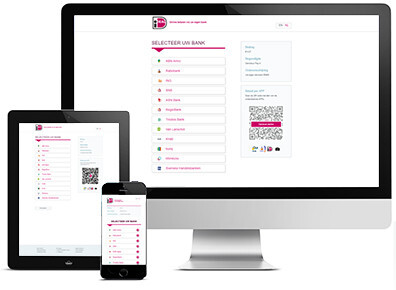
The iDEAL payment screen is responsive, accepts payments in euros, and is available in the following languages:
 Dutch
Dutch English
Demo
- View the iDEAL payment screen
5. QR Code
Your customers can scan a standardized QR code to then make an iDEAL payment.
iDEAL QR Logo
iDEAL QR Code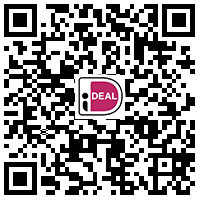
iDEAL QR Code
iDEAL instructional video: how does the QR solution for iDEAL work?
The iDEAL QR codes can be scanned with the following apps:
- Knab
- Rabobank
- ING
- ABN AMRO
- iDEAL
- ASN Bank
- Regio Bank
- SNS Bank
- Regular cameras and QR scanners
Do you want to know how to generate QR codes? Click here.
6. Participating Banks
The Dutch banks listed below are connected to iDEAL:
| ID | Bank name | Icon | Logo | BIC | Status |
|---|---|---|---|---|---|
| 1 | ABN AMRO |  |
 |
ABNANL2A | Active |
| 2 | Rabobank |  |
 |
RABONL2U | Active |
| 4 | ING Bank |  |
 |
INGBNL2A | Active |
| 5 | SNS Bank |  |
 |
SNSBNL2A | Active |
| 8 | ASN Bank |  |
 |
ASNBNL21 | Active |
| 9 | RegioBank |  |
 |
RBRBNL21 | Active |
| 10 | Triodos Bank |  |
 |
TRIONL2U | Active |
| 11 | Van Lanschot Bankers |  |
 |
FVLBNL22 | Active |
| 12 | Knab |  |
 |
KNABNL2H | Active |
| 5080 | bunq |  |
 |
BUNQNL2A | Active |
| 5084 | Revolution |  |
 |
REVONL2A | Active |
| 23355 | N26 | .png?width=70&height=70&name=N26_icon%20(1).png) |
 |
NTSBDEB1 | Active |
| 23358 | Yoursafe |  |
 |
BITSNL2A | Active |
| 23361 | Nationale Nederlanden |  |
 |
NNBANL2G | Active |
HTTP Request
GET https://rest-api.pay.nl/v5/Transaction/getBanks/json
7. Payment Settings
iDEAL Backup Plan
Although the availability of iDEAL is generally good, disruptions at banks and at iDEAL unfortunately cannot be completely prevented. To ensure that you do not lose revenue as a result, PAY. has developed an innovative feature: the iDEAL backup plan. More information about this payment setting can be found here.
End2End
Don't want ''Stichting Pay.nl inzake'' or ''via PAY.nl'' displayed on the customer's statement, you can choose the non-collecting End2End solution. In this case, your customer sees your name and account number as the ''counter account''. You receive the funds directly into your account. However, this results in more incoming transactions, for which your bank may charge you a fee per transaction.
When is End2End interesting for you?
In the table below, we compare End2End payments with the standard iDEAL CPSP route (collecting and clearing via a batch payment).
| End2End | Collecting & batch payment | |
|---|---|---|
| Payment in the name of | Directly in the name of the account holder | 'Your company name' via Pay.nl |
| iDEAL order reference on closing and closing caption | Own order number possible as reference | PAY Order ID. |
| Business account at | All banks, except bunq | All banks |
| Registration fees | Per payment, your bank determines | Per batch, your bank determines |
| Customer pays | Directly into your account | Account of Stichting Pay.nl |
| Payment visible to you | Line by line on your bank statement | One batch payment + detail file from PAY. |
| Continued payment | No costs | Free onward payment |
| Payment speed | Until 2:30 PM on the same day | Until midnight the next day |
| Usage | Invoices and receivables | All types of payments |
| Checks & balances | Via own administration | Automatically by PAY. |
| Refund | Outgoing IBAN payment | Transaction rollback |
| Transaction costs | End-to-end iDEAL rate | All-in iDEAL rate |
With End2End payments, you need to check yourself whether the payment actually arrives.
You can request End2End by emailing your request to PAY. Support including the SL code and payment product.
iDEAL Limit
The standard limit is €10.000,00. If you want to receive payments with a higher transaction amount, contact your account manager or send your justification to PAY. Support
8. Categories
You can use the iDEAL payment option if your webshop / sales location falls into one of the categories below.
| ID | Name |
|---|---|
| 73 | Car & Motorcycle (parts) |
| 20 | Subscriptions (Member service) |
| 21 | Baby & Kids |
| 22 | Beauty & Wellness |
| 6 | Books, Magazines & DVDs |
| 23 | Gifts & Cards |
| 49 | Gift cards, vouchers & call credit |
| 52 | Consumer purchases (average order value) |
| 64 | Crowdfunding, peer-to-peer platforms for lending or paying |
| 40 | Crypto Currency |
| 85 | Deal websites (daily offers and specials) |
| 43 | Animals & Accessories |
| 11 | Digital services dating |
| 10 | Digital entertainment (Gaming & Mediums) |
| 1 | Digital entertainment (Adults) |
| 55 | Digital products (software, downloads) |
| 32 | Education & Training |
| 4 | Electronics |
| 46 | Only on the advice of PAY: Special consumer products |
| 25 | Food & Drink |
| 70 | Invoicing |
| 26 | Fashion, Clothing & Shoes |
| 27 | Gadgets |
| 82 | Mind-altering products (legal) |
| 24 | Health |
| 28 | Charities (ANBI status) |
| 61 | Traders in precious metals and diamonds |
| 30 | Watches & Jewelry |
| 29 | Home & Interior |
| 88 | Medical devices |
| 31 | Music, Movies & Games |
| 76 | Parking including reservation |
| 5 | Jewelry & Accessories |
| 34 | Toys |
| 35 | Sports & Leisure |
| 79 | Tobacco & E-cigarettes |
| 7 | Admission tickets (ticketing) |
| 33 | Garden & Tools |
| 36 | Holidays & Travel |
| 37 | Department stores |
| 9 | Business services |
9. Images
If you want to display the iDEAL logo on your page, you can use the images below.
| PNG icon | SVG icon |
|---|---|
 |
 |
10. Documents
| Document | Description |
|---|---|
| iDEAL acceptance criteria | The minimum acceptance criteria for iDEAL (established by Currence). |
| iDEAL rules and conditions | The supplier has set a number of conditions for the use of iDEAL. |
| Mobile payments via iDEAL | Information about using iDEAL on mobile platforms. |
11. Video
Paying with iDEAL
iDEAL instructional video: how does a transaction paid via iDEAL work?