
1. Information
| Facts | |
|---|---|
| Category | Bank payments |
| Market | Portugal |
| Share | 30% share of the payments market |
| Currency | Euro (EUR) |
| Payment | Multibanco is not a guaranteed payment method |
| Refund | No refunds possible |
| Clearing | via PAY. |
| Status | ✔️Active |
| Expiration date | Payment must be made within 3 days. |
| Payment option ID | 2271 |
| Package | Available in the Pioneer , Professional , Business , and Corporate packages. |
| Surcharging | Not allowed |
Multibanco is the most widely used payment method in Portugal and is offered in many places, such as supermarkets, airports, and museums. Multibanco has broad reach in Portugal, partly because the payment method is a user-friendly way for the Portuguese to handle tax matters.
Multibanco is offered as a payment method by more than 11.000 ATMs. In addition to withdrawing cash, you can also use Multibanco to print online bank statements, pay bills, buy train tickets, top up transport cards, and even top up your mobile phone balance.
The payment method works with all major Portuguese banks, enabling merchants internationally to offer payments via Multibanco.
2. Payout
Multibanco transactions come in via Stichting Pay.nl and are paid out to you via clearing. There is no need to create an extra account or enter into an agreement with Multibanco.
To allow your customer to make a payment with the Multibanco payment method, you need to provide the payment page with an entity number, the reference, and the amount of the purchase.
The customer then initiates a payment with this information via online banking or an ATM, using the familiar Multibanco details.
Payout speed
Curious about your payout speed? You can easily check this via Merchant » Rates.
3. The process flows of Multibanco:
Multibanco via online banking
Multibanco via an ATM
Multibanco via online banking
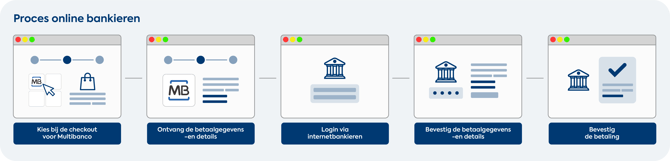
- Your customer chooses Multibanco as the payment method in your webshop's checkout.
- The payment page provides your customer with an entity number, the reference of the purchase, and the amount.
- Your customer then logs in via online banking and confirms the payment by agreeing to the familiar payment information and details
- The customer has paid, and you can prepare the purchase for shipment!
Image: Multibanco via online banking
Multibanco via an ATM
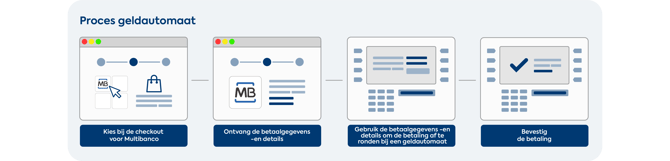
- Your customer selects the 'checkout with Multibanco' option at one of the 11.000 ATMs.
- Via the ATM, the customer receives the familiar payment information and details.
- If they agree, your customer confirms the transaction by paying.
Image: Multibanco via an ATM
4. Payment screen
The Multibanco payment screen is responsive, accepts payments in euros, and is available in the following languages:
 English
 Portuguese
5. Categories
You can use the Multibanco payment option if your webshop / sales location falls into one of the categories below.
| ID | Name |
|---|---|
| 20 | Subscriptions (Member service) |
| 73 | Car & Motorcycle (parts) |
| 21 | Baby & Kids |
| 22 | Beauty & Wellness |
| 6 | Books, Magazines & DVDs |
| 23 | Gifts & Cards |
| 52 | Consumer purchases |
| 85 | Deal websites (daily offers and specials) |
| 11 | Digital services dating |
| 55 | Digital products (software, downloads) |
| 32 | Education and training |
| 4 | Electronics |
| 25 | Food & Drink |
| 26 | Fashion, Clothing & Shoes |
| 27 | Gadgets |
| 24 | Health |
| 61 | Traders in precious metals and diamonds |
| 30 | Watches & Jewelry |
| 29 | Home & Interior |
| 31 | Music, Movies & Games |
| 5 | Jewelry & Accessories |
| 34 | Toys |
| 35 | Sports & Leisure |
| 7 | Admission tickets (ticketing) |
| 33 | Garden & Tools |
| 36 | Holidays & Travel |
| 37 | Department stores |
| 9 | Business services |
6. Images
If you want to display the Multibanco logo on your page, you can use the images below.
| PNG icon | SVG icon |
|---|---|
 |
 |