
With Authorisation & Capture you first reserve an amount on the customer's payment card (AUTH). The amount is not yet debited at that point. Only once the authorisation is captured is the amount actually collected.
This functionality is available for Pay.POS InStore Payments on all devices that support Pay.POS,
Supported Payment MethodsAuthorisation & Capture for in-store payments is supported for:
- Visa
- Mastercard
- V Pay
- Maestro
Activating AUTH
AUTH transactions are disabled by default.
To have AUTH activated, send an email to pin@pay.nl with:
- the TH-code of the terminal(s);
- a note that you want to use AUTH transactions.
After confirmation from the PIN department, AUTH will be activated on the specified terminal(s).
Available Integrations
AUTH is available for:
Starting an AUTH Transaction
Stand Alone
After AUTH has been activated:
-
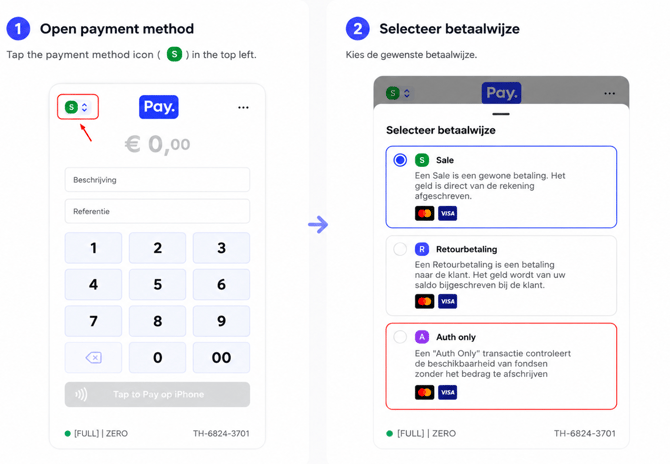
In the top left of the Pay.Pos app, tap the green icon with the "S"
-
Enter your access code
-
The app now switches to REFUND/AUTH mode
- 🟢 Green S = SALE (normal payment)
- 🔵 Blue R = REFUND (refund payment)
-
🟣 Purple A = AUTH (authorisation)
-
Enter the amount and have the customer present their card
-
After completion, the app automatically switches back to SALE
Local Connect
When you use Local Connect, an AUTH transaction can be started directly from the checkout software.
The technical implementation and the transaction message are described in the Local Connect documentation at developer.pay.nl.
Performing a Capture
After a successful authorisation, the transaction still needs to be captured.
This can be done in two ways:
- via the PAY Dashboard (full capture);
- via the Capture API (full or partial capture).
| Functionality | Dashboard | API |
|---|---|---|
| Full Capture | ✅ | ✅ |
| Partial Capture | ❌ | ✅ |
| Multi Capture | ❌ | ❌ |
A capture can be performed starting 15 minutes after the authorisation and must take place within 5 days.
More information about the Capture API can be found in the Developer Documentation under:
Partial Capture
With a Partial Capture, only part of the authorised amount is debited. The remaining amount is automatically released back onto the customer's payment card.
Example:
- Authorised: €100,00
- Final amount debited: €82,50
In this case, €82,50 is collected and the reservation for the remaining €17,50 is released.
Note! ⚠️
Partial Capture is only available via the API. The PAY Dashboard only supports a full capture.
For the technical implementation of Partial Capture, please refer to the Authorisation: Capture
VOID
When an authorised payment is ultimately not captured, the authorisation automatically expires. Currently, the reserved payment is automatically released by the card issuer after 7 days.
🟣 Note: An authorised payment that is not captured within the applicable capture period can no longer be collected afterwards. A VOID transaction is currently not available for this.