
What is Pay.Parts?
With Pay.Parts, merchants can offer customers a flexible and optimized payment experience while maintaining control over the look and feel and user experience of their checkout.
Are you implementing Pay.Parts? For technical implementation details, code examples, and SDK guidance, visit the Pay.Parts Developer Documentation.
The components are loaded through the PayParts.js SDK and can be used to display various payment options, such as card payments, Apple Pay, Google Pay, PayPal, gift cards, and other available payment methods.
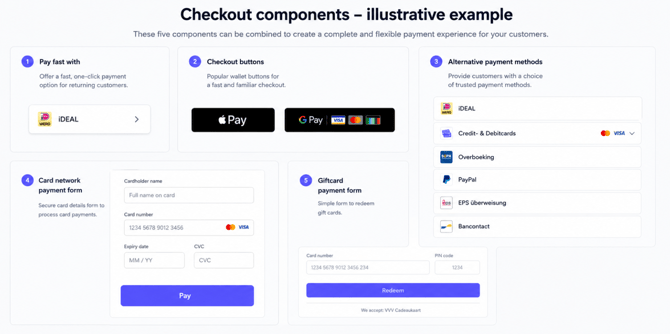
A working example is available at parts.pay.nl
How does Pay.Parts work?
The merchant or partner integrates Pay.Parts into their own checkout flow using the PayParts.js SDK.
- The merchant's backend creates a Pay.Parts session.
- The frontend initializes the Pay.Parts SDK using the received session token.
- The required payment components are displayed in the checkout.
- The customer completes the payment.
- Pay. returns the payment result through the configured return flow and/or webhook.
With Pay.Parts, merchants can create their own checkout experience while using Pay.'s payment infrastructure.
Met Pay.Parts kunnen merchants een eigen checkoutervaring creëren, waarbij gebruik wordt gemaakt van de betaalinfrastructuur van Pay.
I can't process a transaction with Pay.Parts. What should I check?
If a payment method is unavailable or a transaction cannot be processed, first check whether the relevant payment method has been boarded for the correct sales location.
A payment method available within Pay.Parts must first be activated and configured separately before it can be used to process transactions.
Check the following:
- Is the payment method activated for the correct sales location?
- Has the required onboarding process been completed?
- Is the payment method active in the Pay. environment?
Once the payment method has been successfully boarded, it can be used within Pay.Parts.
Which payment methods are available in Pay.Parts?
The available payment methods depend on the payment methods activated for your service.
Pay.Parts supports various components, including:
- Card payments
- Apple Pay
- Google Pay
- PayPal
- Gift cards
- Payment method selection components
Only payment methods activated for the merchant can be displayed and used in the checkout.
How do I integrate Pay.Parts?
To integrate Pay.Parts, follow these steps:
- Create a Pay.Parts session from your backend.
- Add the Pay.Parts SDK to your frontend.
- Initialize the SDK using the session token.
- Create the required payment components and add them to your checkout.
- Process the payment status and results within your application.
For the complete technical implementation, refer to the Pay.Parts integration documentation.