
Do you regularly send a payment link to your customers? Or would you like to easily add an iDEAL link to your invoices? With PAY.'s dynamic payment link module, you can create a professional payment screen within minutes where customers can pay directly.
You decide what the payment screen looks like and which options you offer. You can also configure and secure the payment link as needed.
- Amount
Determine which amount the customer can pay. You can choose a free-choice amount, a minimum or maximum amount, or a fixed amount. - Free Fields
Add up to three optional free fields to collect extra information or pass it along with a payment. For example, ask your customer to fill in a name or email address, or pre-fill a value yourself, such as a customer or order number. - Payment Methods
Choose which payment methods you want to offer your customers. - Custom Thank-You Page
After a successful payment, the customer sees the default message 'Thank you for your payment' on the payment screen. You can also choose to automatically redirect the customer to your own thank-you page. - Country and Language
Set a default country and default language for the payment screen. The available payment methods are grouped and displayed per country. Customers can adjust the language of the payment screen themselves.
Flexible to Use
With the extensive link generator, you can easily create a dynamic payment link. Unlike a one-time payment link, a dynamic payment link remains valid indefinitely.
Depending on your security settings, you can also dynamically pass information such as amounts, customer numbers, or order numbers along with the link. This makes dynamic payment links particularly suitable for applications such as digital invoices, emails, or other payment requests.
Payment Screen
PAY.'s payment screen for dynamic payment links looks like this:
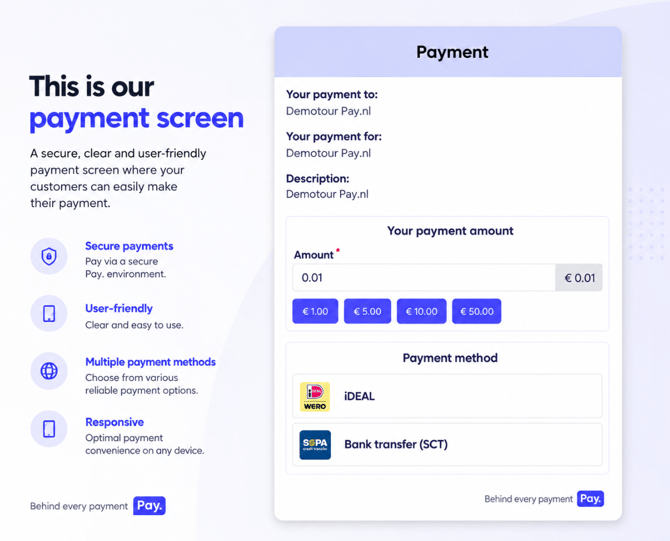
The payment screen is responsive, accepts payments in euros, and is available in the following languages:
 Dutch
Dutch English
 German
 French
 Spanish
 Italian
Setting Up the Payment Link Module
Before we can create a dynamic payment link, we first need to set up a sales location for it once. Follow the steps below to do this.
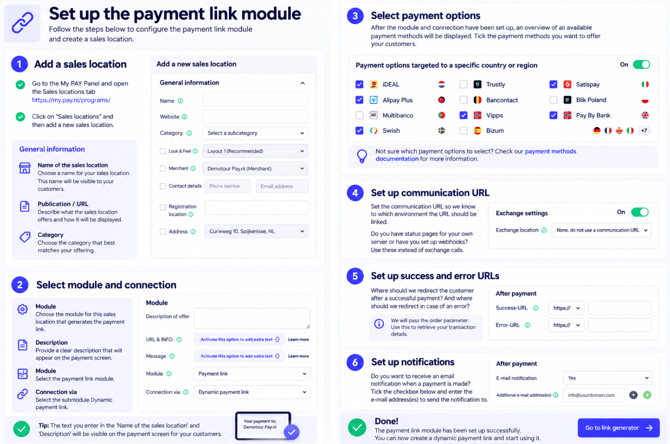
Depending on your package, more fields may be displayed than those mentioned above. Contact your account manager if you have any questions about this.
Creating a Payment Link
We have now created a sales location that we will use to create a dynamic payment link. We can add various characteristics and security settings to this dynamic payment link. Setting up and generating a dynamic payment link works as follows:
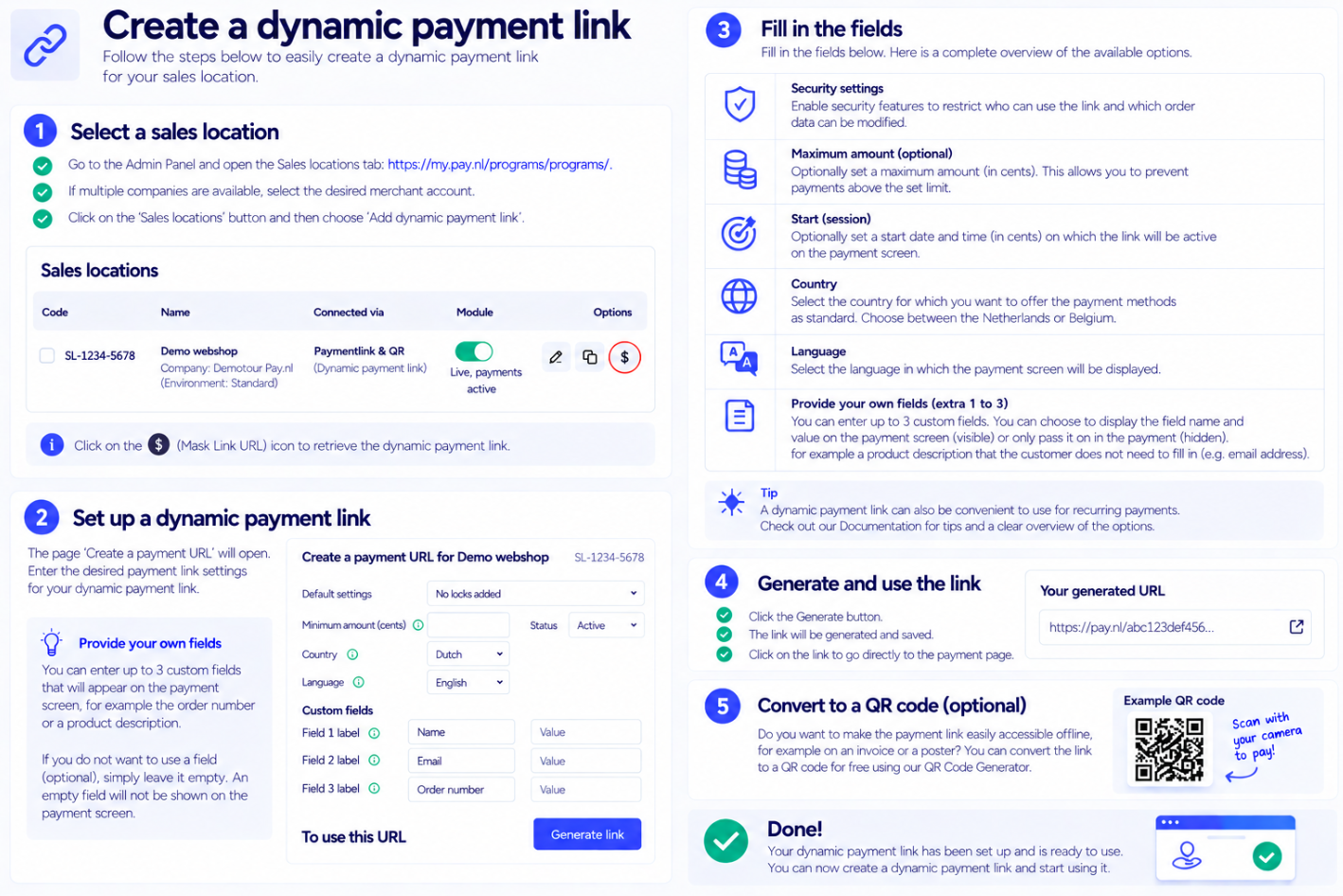
Tip: A generated dynamic payment link can sometimes contain quite a lot of characters. Using a URL shortener such as Bitly you can easily convert it into a short URL.
Security Settings
While generating a dynamic payment link, you can choose from four different security levels. The table below shows, per security level, which parts of the payment link can be adjusted.
| Element | 1 – Flexible | 2 – Fixed amount | 3 – Fixed variables | 4 – Fully fixed |
|---|---|---|---|---|
| Standard amount via URL | ✓ | ✕ | ✕ | ✕ |
| Standard amount via payment screen | ✓ | ✕ | ✕ | ✕ |
| Minimum amount via URL | ✓ | ✓ | ✕ | ✕ |
| Minimum amount via payment screen | ✓* | ✕ | ✕ | ✕ |
| Free field label via URL | ✓ | ✓ | ✕ | ✕ |
| Value of free fields via URL | ✓ | ✓ | ✕ | ✕ |
| Value of free fields via payment screen | ✓ | ✓ | ✓ | Only when empty |
✓ Adjustable · ✕ Not adjustable
* If no default value has been set.
Security Levels
Under Security Settings, choose how many parts of the dynamic payment link may be changed afterward. The higher the security level, the more parts are locked.
| Security level | Institution | Explanation |
|---|---|---|
| 1 – Flexible | Do not perform checks | The URL and the amount are flexible. The amount, the variables, and the corresponding values can be adjusted. |
| 2 – Fix amount | Fix amount only | The amount is fixed. The rest of the URL, including variables and values, can be changed without checks. |
| 3 – Fixing variables | Pin prefilled variables | The amount is fixed. Pre-filled variables cannot be changed or deleted via the URL. The user can, however, still enter the corresponding values via the form. |
| 4 – Fully tighten | Do not allow changes | The amount and variables are fixed. Only empty variables can be entered by the user via the form. |
In short: the higher the security level, the fewer parts of the payment link can be adjusted afterward.