
The Verifone P400 is a fixed payment terminal that can be used in combination with a cash register system or as a standalone payment solution. The terminal supports chip, magnetic stripe and contactless payments (NFC) and is usually connected via a network cable (LAN).
Frequently Asked Questions
How do I calculate the service password?
How do I manually perform a Contact TMS?
How do I manually perform a Contact Acquirer?
How do I configure WiFi?
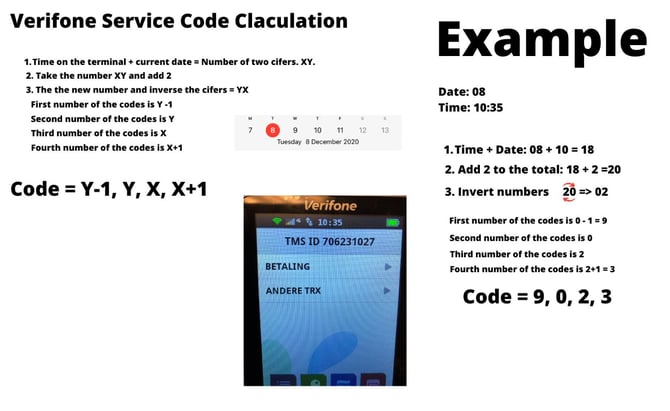
How do I calculate the service password?
How do I manually perform a Contact TMS?
Step 1. To access the main menu, press the following key combination:
STOP - OK - 3x COR - COR - COR (red – green – 3x yellow)
Step 2. Enter the service password
- Chose "Manager Menu"
Enter manager password (default: 99999) -
Chose "Functions"
-
Chose "Terminal"
-
Chose "Contact TMS"
How do I manually perform a Contact Acquirer?
Step 1. To access the main menu, press the following key combination:
STOP - OK - 3x COR - COR - COR (red – green – 3x yellow)
Step 2. Enter the service password
- Chose "Manager Menu"
Enter manager password (default: 99999) -
Chose "Functions"
-
Chose "C-TAP"
-
Chose "Equens" or "CCVPAY"
How do I configure WiFi?
WiFi is only available on a P400 PLUS. If you have a standard P400, only LAN connection is possible.
Step 1. To access the main menu, press the following key combination:
STOP - OK - 3x COR - COR - COR (red – green – 3x yellow)
Step 2. Enter the service password
- Chose "Manager Menu"
Enter manager password (default: 99999) -
Chose "Configuration"
-
Chose "Terminal"
-
Chose "Communication"
-
Chose "Wifi" and select "Enable Wifi"
-
Chose "Search networks"
-
Select the desired network. Enter the WiFi password (see keyboard table below)
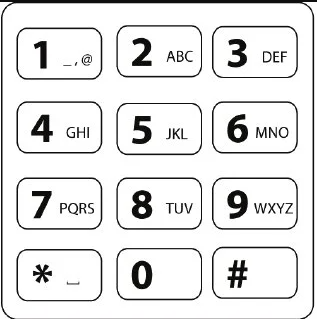
After entering a letter or symbol, wait 1 second before entering the next character.