
Add ANTI/TRUST Rule
PAY. checks every credit card transaction for possible fraud; we call this system the VERIFY. In addition to our standard checks and adding a customerTrust score to the Transaction::start, it is possible to influence the VERIFY yourself using the ANTI TRUST.
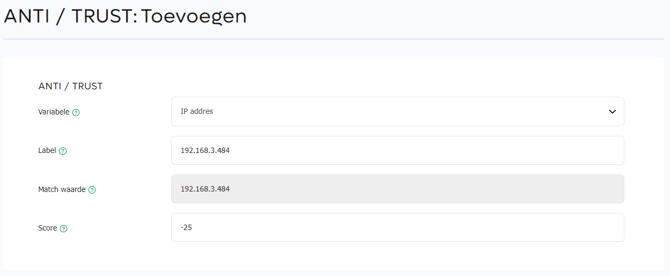

In the ANTI/TRUST you can add variables. Each variable has a value. You give each unique value a score. If the value of a variable matches during the fraud check of a transaction, VERIFY applies the entered score. For example, if the variable Address key has a negative score of -25, for example because this address is used in fraudulent transactions, it will by default trigger the VERIFY on future credit card transactions. If the same variable has a positive score of 25, for example because it is a trusted delivery address, the transaction will be processed without a VERIFY status being assigned.
Available variables are:
| Variables | Match values | Score |
|---|---|---|
| Email address | Full email address | -25 to 25 |
| CustomerKEY (encrypted value) | Unique hash created by the Transaction::start API. | -25 to 25 |
| Address key | Format: countryCode+ zipCode+streetNumber+streetNumberExtension For example: NL-7547TK-10 |
-25 to 25 |
| IP address | IPv4 format | -25 to 25 |
| customerReference | End-user reference that you sent during the Transaction::start. | -25 to 25 |
| CustomerID | Customer identifier, for example the credit card or IBAN bank account number | -25 to 25 |
You can find all the variables from the table above in the Transaction information popup in the PAY. Admin.
Remove ANTI/TRUST Rule
If you want to change a new or already added value, click the button behind the added rule Edit. If you want to remove a value, select the rule. Then click the dropdown menu and choose Delete. Click OK to actually remove the value. Note: deleted values cannot be restored.