
You can get acquainted with our services without obligation for the first three months, or make selective use of the payment options. After this period, if your payment mix is incomplete, we will upgrade your agreement to the Business package.
PAY. has an in-depth collaboration with some partners and platforms. In this case, PAY.'s payment solutions are fully integrated into the Partner's platform or software. For the customers of these Alliance Partners (submerchants), PAY. has a package in which the features, payout speeds, and rates depend on and are determined by the type of service and the way of working with this Partner. The setup of this is therefore determined in consultation with the partner. This Partner is therefore your first point of contact; PAY. cannot simply change features or turn (payment) options on or off.
1. Package Costs
PAY. packages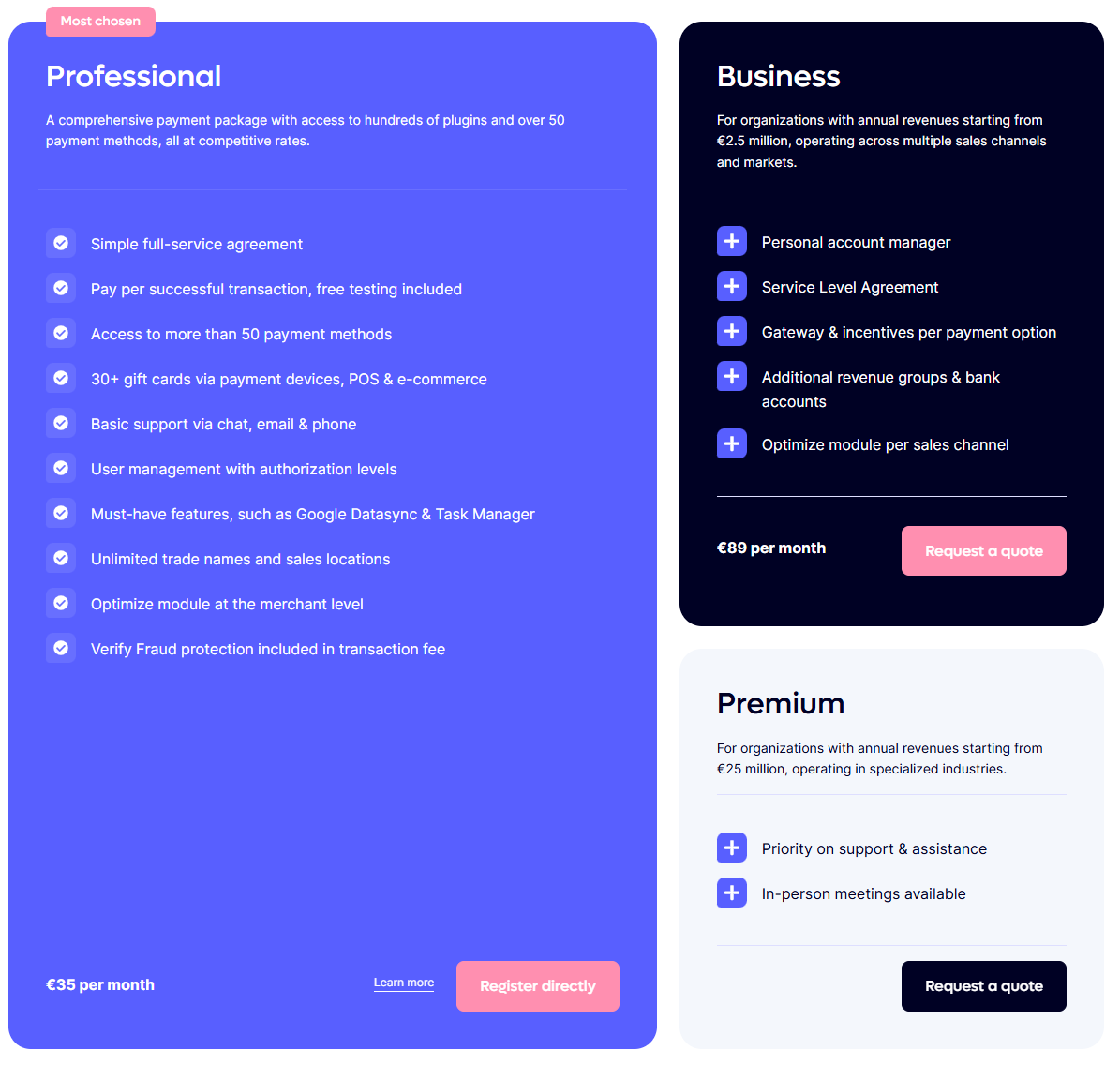
The costs (excluding VAT) for the different packages are shown below.
 Pioneer Pioneer |
 Professional Professional |
 Business Business |
|
|---|---|---|---|
| Monthly costs | Free | €35.00 | €89.00 |
| Setup costs | Free | Free | Free |
Upgrading a package is possible at any time via your Admin Panel. Paid packages are valid for a duration of 1 year and are then renewed every 3 months.
2. Features
PAY. has developed various features that expand the possibilities within your package. The most important features and services are shown below.
 Pioneer Pioneer |
Professional |
Business |
 Corporate Corporate |
|
|---|---|---|---|---|
| Options | ||||
| Payment frequency | Every Tuesday | Daily | Daily | Daily |
| Cost payout | Free | Free | Free | Free |
| Number of sales locations | 3 | 5 | 10 | Unlimited |
| Accounting software exports | Basic | Extensive | Extensive | Extensive |
| Create payment links | ✔️ | ✔️ | ✔️ | ✔️ |
| Processing refunds | ✔️ | ✔️ | ✔️ | ✔️ |
| Plugins | ✔️ | ✔️ | ✔️ | ✔️ |
| Second chance module | ✔️ | ✔️ | ✔️ | ✔️ |
| iDEAL backup plan | ✔️ | ✔️ | ✔️ | ✔️ |
| SMS module | ✔️ | ✔️ | ✔️ | ✔️ |
| Donation module | ✔️ | ✔️ | ✔️ | ✔️ |
| Mobile app | ✔️ | ✔️ | ✔️ | ✔️ |
| Exchange logs | ✔️ | ✔️ | ✔️ | ✔️ |
| Credit card payments | ✖️ | ✔️ | ✔️ | ✔️ |
| Direct debit payments | ✖️ | ✔️ | ✔️ | ✔️ |
| Use trade name | ✖️ | ✔️ | ✔️ | ✔️ |
| Add employees | ✖️ | ✔️ | ✔️ | ✔️ |
| Permissions per account | ✖️ | ✔️ | ✔️ | ✔️ |
| Multiple bank accounts | ✖️ | ✖️ | ✔️ | ✔️ |
| High-risk payments | ✖️ | ✖️ | ✔️ | ✔️ |
| Affiliate package | ✖️ | ✖️ | ✖️ | ✔️ |
| Support & Service | ||||
| Telephone support *3 | 09:00 - 17:30 | 09:00 - 17:30 | 09:00 - 17:30 | 09:00 - 17:30 |
| Chat support *3 | 09:00 - 17:30 | 09:00 - 17:30 | 09:00 - 17:30 | 09:00 - 17:30 |
| Support by email | ✔️ | ✔️ | ✔️ | ✔️ |
| 24/7 Breakdown Service | ✔️ | ✔️ | ✔️ | ✔️ |
| End user support | ✔️ | ✔️ | ✔️ | ✔️ |
| Service level agreement | ✖️ | ✔️ | ✔️ | ✔️ |
| Personal Account Manager | ✖️ | ✖️ | ✔️ | ✔️ |
| Statistical insight | ||||
| Transaction overview | ✔️ | ✔️ | ✔️ | ✔️ |
| Payment mix overview | ✖️ | ✔️ | ✔️ | ✔️ |
| Management overview | ✖️ | ✔️ | ✔️ | ✔️ |
| Trends and insights | ✖️ | ✔️ | ✔️ | ✔️ |
| Comparison graphs | ✖️ | ✖️ | ✔️ | ✔️ |
- PAY. has a distributing role. To use this, an account with the payment method must be created.
- Extra costs are charged for these features. Request a no-obligation quote.
- Paid packages receive premium support Monday through Thursday until 22:00.
3. Alliance Package
In addition to the 4 standard packages, PAY. also offers another package: The Alliance package. With this package, you offer your business customers the option to receive payments within your own system. The Alliance package is suitable for, among others (but not limited to):
- Webshop builders who offer a hosted solution (SaaS solution) to many customers.
- Donation websites (that receive payments for many charities).
- Product comparison sites (or apps) that receive payments for many providers.
- Franchise chains (where payments are received for multiple franchisees)
- Food ordering sites, with multiple restaurants.
- Ticketing parties with different event organizers.
- Reservation systems in the broadest sense of the word
You invoice your customer for your services. In this, you directly settle the transaction costs. Your customer only needs to sign and upload the 'single-page' agreement with PAY. once: after that, you can begin.
4. Upgrading
Change Package Options
Your Current Package
Do you want to benefit from sharper rates or use a feature in a higher package? Then you can easily upgrade your package yourself via the Admin Panel. You can then immediately use the features that belong to this package, and from the upgrade onward you receive the rates that apply within this package.
Set Up New Package
- In the Admin Panel, go to the tab Merchant » Company https://my.pay.nl/my_merchant.
- At 'Agreement', you see your current package displayed. Click the 'Change package options' link listed next to your package. Image: Change Package Options
- A 'Change package options' popup opens. At the top of the popup, the package you currently have with PAY. is shown in pink. Image: Your Current Package All options that fall within your package can be selected. Options in a higher package can only be viewed.
- To perform a package upgrade, click the package you want at the top of the popup. It will then turn pink. The options that belong to this package become immediately available and can therefore be selected by you.
- Click the 'Save' button in the popup! to carry out the package upgrade.
5. Activating Package Options
PAY. has already activated the most commonly used features and payment methods within a package for you by default, so you can use them immediately. However, to keep the Admin Panel organized, it is necessary to activate some options first.
Change Package Options
Available Package Options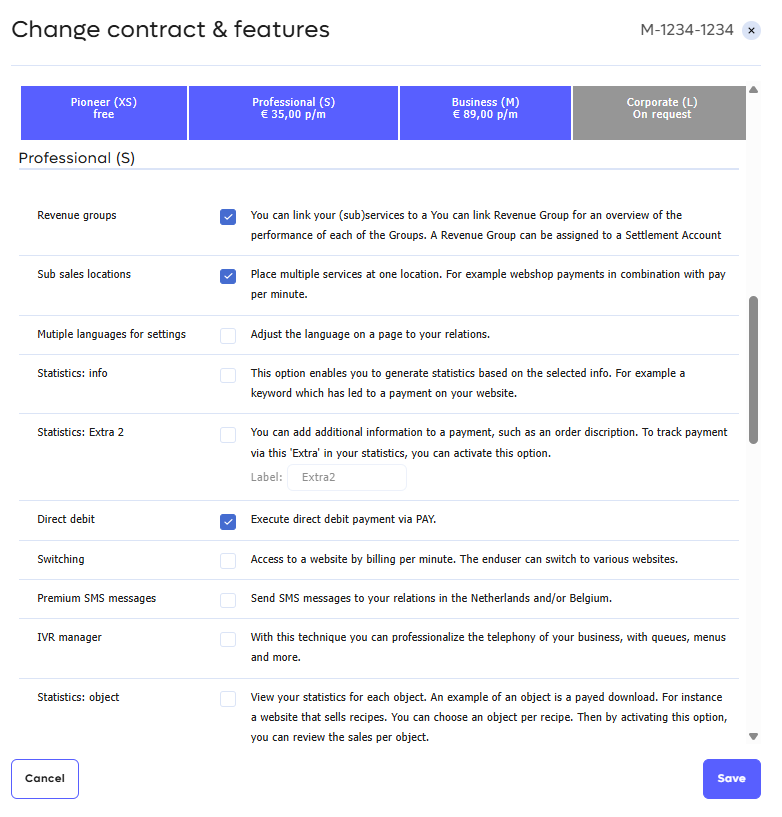
Examples of package options that need to be activated first are:
- Payment method PayPal Pioneer package
- Payment method Direct Debit Professional package
- Payment method Credit card Professional package
- Feature Second Chance Pioneer package
- Feature iDEAL Backup Pioneer package
- Feature use of trade name Professional package
- Feature clearing to different bank accounts Business package
Change Package Options
- In the Admin Panel, go to the tab Merchant » Company https://my.pay.nl/my_merchant.
- Click the 'Change package options' link. Image: Change Package Options
- A 'Change package options' popup opens. You can of course only select the options that are available within your package. Options for which you need a higher package are shown in gray Image: Available Package Options and can only be viewed. Do you want to use the features and payment options of a higher package? Within a few clicks, you can upgrade your package yourself.
- In the popup, find the desired option and make sure the checkbox is checked Image: Activating a Package Option.
- Click the 'Save' button in the popup! to carry out the package changes.