
If a Sunmi terminal is currently managed through another SUNMI MDM account, the current administrator can easily transfer the device to the PAY MDM platform.
Requirements
- You have access to the current SUNMI MDM account where the terminal is registered.
- You have the terminal's serial number.
- The terminal must be a supported Sunmi model and meet the minimum requirements for PAY.POS on Sunmi.
Step 1 – Sign in to the SUNMI Partner Portal
Sign in to the SUNMI Partner Portal
Step 2 – Open the transfer page
Navigate to: Device → Transfer Device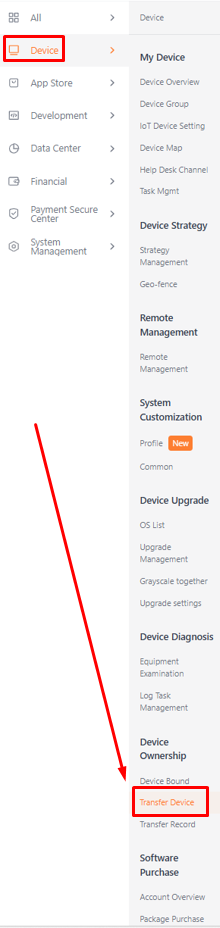
Step 3 – Select the terminal
Search for the terminal using its serial number and select the device you want to transfer.
Step 4 – Enter the PAY Entity (Account) ID
Under Receiver, select Entity (Account) ID and enter the following value:
DRGH9UTFQZYHV
This is the official PAY Entity (Account) ID.
Step 5 – Confirm the transfer
Verify that you have selected the correct terminal and click Confirm to complete the transfer.
Step 6 – Notify Pay.
After the transfer has been completed successfully, send an email to pin@pay.nl informing us that the Sunmi terminal has been transferred to the PAY MDM.
Please include the following information:
- The terminal serial number.
- The terminal model (for example, Sunmi P2, P2 SmartPad, or P3).
Once we receive your email, PAY will verify the transfer and complete the terminal configuration.
The terminal must be a supported Sunmi model and meet the minimum requirements for PAY.POS on Sunmi.