
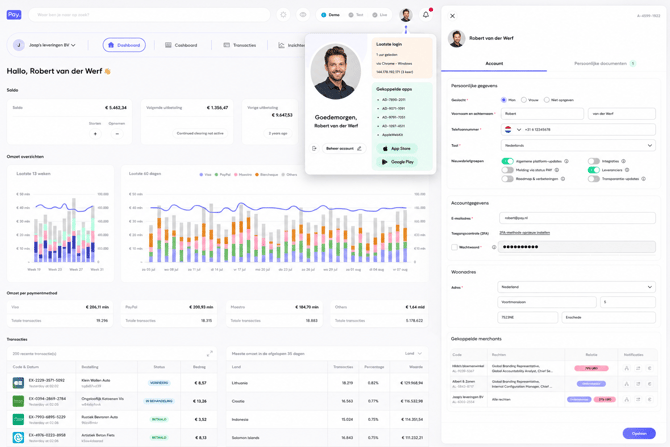
The new PAY. dashboard was developed to make the day-to-day management of payments and your organization simpler and clearer. Account management, merchants, sales locations, transactions, and reports all come together in one central environment.
This means the dashboard isn't just a place to look up payments. It's increasingly becoming the central self-service environment of PAY., where merchants and partners can independently manage their payment environment. This focus on an intuitive interface, self-service, and automation aligns with the further development of PAY.'s customer applications.
One dashboard, different components
The dashboard is built from different components. Depending on your account, permissions, and services, you get access to the components that are relevant to your organization.
The new dashboard is therefore more than a refreshed interface. It forms the basis for the next generation of PAY.'s customer applications, in which ease of use, self-service, and automation play an increasingly important role.
One environment for your account, merchants, sales locations, payments, insights, and hardware. This makes managing your payment environment increasingly simple.
Account Management
Within Account Management you manage the data and settings associated with your PAY. account. This gives you access, from one central environment, to the administrative and organizational side of your account.
The principle is simple: being able to manage as much as possible yourself, without having to contact PAY. for every change.
Merchant Management
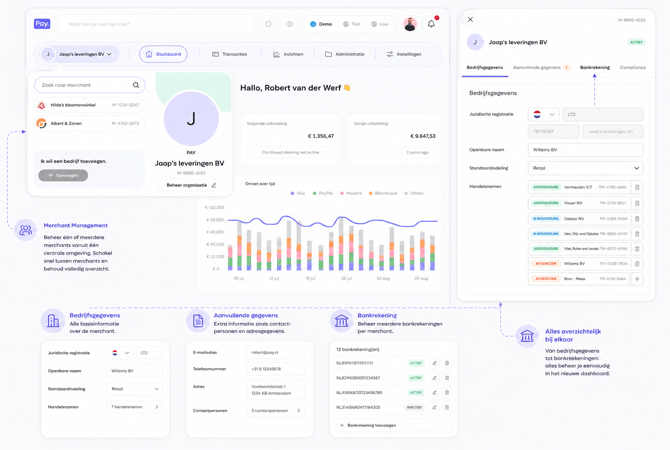
For organizations and partners that manage multiple merchants, Merchant Management plays an important role. The dashboard creates one central environment for managing and consulting merchants.
This component is also an important domain in the further development of the PAY. platform. PAY. explicitly focuses the development of its customer applications on, among others, Dashboard, Merchant & Account Management, GMS, and Reporting.
Cashboard: quickly create a payment from the PAY. dashboard
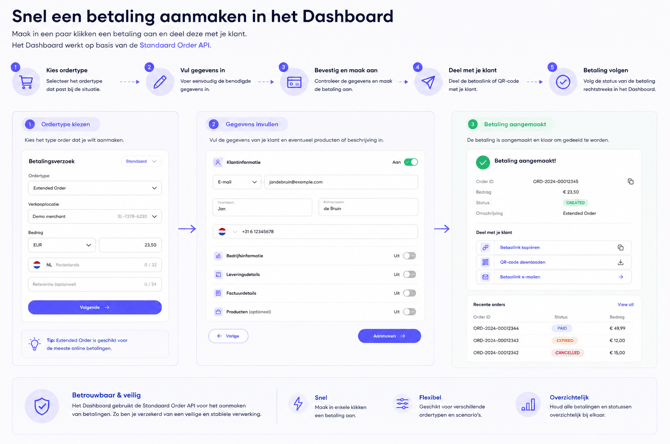
With Cashboard, employees can easily create a payment from the PAY. dashboard. Useful, for example, when you receive an order by phone, want to send a customer a payment link afterward, or want to set up a one-off payment without performing a separate technical action for it.
Creating a payment in a few steps
In Cashboard, you first choose which type of order you want to create. You then select the sales location, enter the amount, and add additional information where needed, such as customer information, delivery details, invoice details, or products.
This allows an employee to quickly set up a complete payment from a single screen.
Built on the same Order:Create API
Under the hood, Cashboard uses the standard Order:Create API from PAY. An order created via Cashboard therefore uses the same payment infrastructure as an order created directly via the API. The Order:Create API supports, among other things, amounts, references, customer data, order information, split payments, and additional transaction data. (PAY.)
Integrating yourself?
Want to create payments automatically from your webshop, ERP, CRM, or other software? Check out the technical documentation for Order:Create at developer.pay.nl. There you'll find all available fields, responses, and examples, and you can also test the API interactively. (PAY.)
View the Order:Create API documentation
Sales Locations
A merchant can have one or more sales locations. In the new dashboard, these locations are easy to find and manage.
This is especially useful for organizations with multiple shops, websites, labels, or other sales channels. You can navigate to the right sales location from the same environment and manage the associated payment environment.
As a result, the structure of the dashboard better matches the way an organization is actually structured in practice: from account to merchant, and then to the individual sales locations.
Orders & Payments
Via Payments, you get insight into the transactions processed via PAY. The dashboard thus forms the central starting point for day-to-day payment management.
Rather than just a technical overview of transactions, we want to make information genuinely useful. You should be able to quickly find out what happened with a payment and take the right next step based on that information.
The payment process itself remains the highest priority within PAY.'s development, with an emphasis on availability, speed, stability, security, and scalability.
Reports & Insights
Data only becomes truly valuable when you can do something with it. That's why Reports & Insights is an important part of the new dashboard.
Here we bring together information about payment activity to give merchants better insight into their performance. As a result, the dashboard is evolving from a management environment into a place where you can not only see what happened, but also gain better insight into your payment flows.
Reporting is therefore, alongside the dashboard and Merchant & Account Management, one of the important customer applications within the PAY. platform.
Hardware Shop
A handy feature in the new platform is the PAY. Hardware Shop. From this environment, merchants can view and order payment terminals.
The process has deliberately been kept simple: go to the Shop, view the available hardware range, choose a suitable payment terminal, and place the order.
This makes hardware part of the same self-service experience as the rest of the platform. A merchant no longer needs to go through a separate ordering process outside the dashboard to purchase new payment hardware.
The Hardware Shop supports various payment terminals and makes it possible to place an order directly from the PAY. platform.