
1. Regulations / Applications
If you activate a credit card, you must:
- Having delivered all documentation for a compliant file.
- Your file has been reviewed and accepted.
- Your contact details, including registration number (Chamber of Commerce), are on the website.
- You have provided an email address and phone number for consumer inquiries in your merchant connection.
- You have posted general terms and conditions on your website that comply with laws and regulations.
Boarding request status button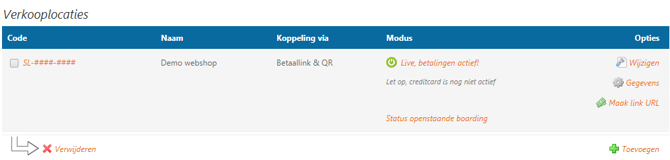
Boarding status overview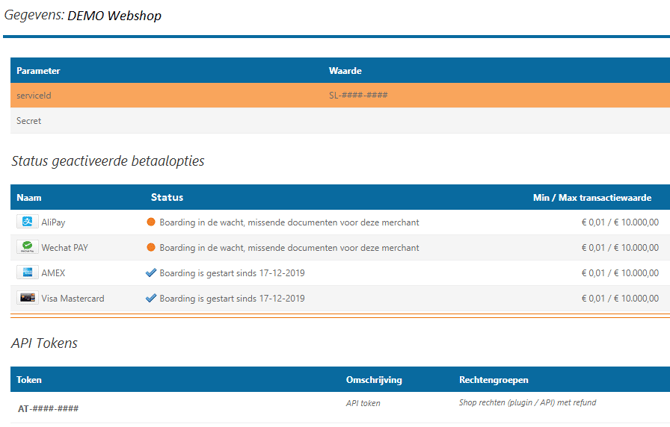
For every sales location you register within PAY., ensure you enter the correct category and a clear description of your offer: what you sell and to which target audience. PAY. will then place your request in one of the thousands of "Merchant Category Codes" (MCCs). An incorrectly used MCC code will result in an incorrect description on your customer's statement. This can lead to a lower success rate (more payments being rejected) or fines being imposed by credit card companies.
If you register a sales location using a credit card and it is rejected during the process because your website does not comply with the above rules, a review fee of €50 will be charged per instance.
| Document | Description |
|---|---|
| VISA rules and regulations | Rules for the use of a VISA credit card. |
| Mastercard rules and regulations | Rules for the use of a Mastercard credit card. |
| Mastercard security rules & procedures | Safety rules for using a Mastercard credit card. |
Unlike the other payment methods, credit cards are not immediately available. Your webshop must first be approved by our credit card acquirer. After approval, you will receive a notification from us and you can accept payments via Mastercard.
You can track the status of the boarding via the Sales Locations overview. For each Sales Location, you will find a "Status of open boardings" button. If you click on this button, you will see an overview of (open) boardings and their current statuses.
Important: Please allow 1 - 2 weeks before your credit card connection is active.
2. PCI-DSS obligations
PCI Compliance Levels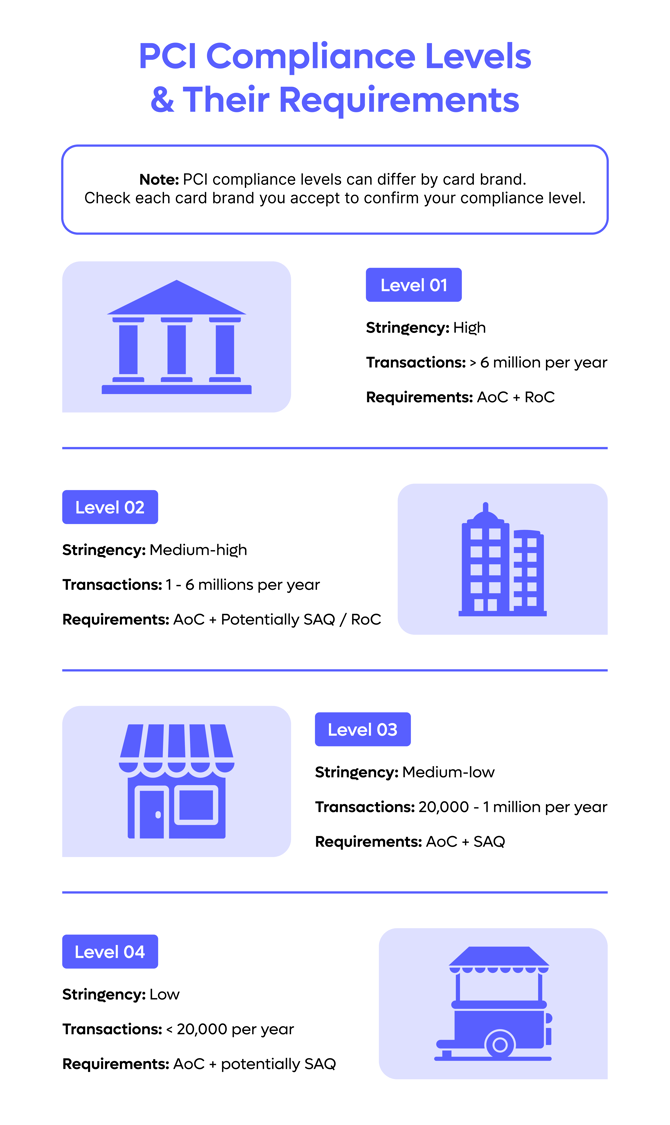
If you offer credit cards as a payment option to your customers, you must comply with additional security rules from the credit card companies. These rules are described in the so-called “Payment Card Industry – Data Security Standard” (PCI-DSS) and serve to prevent customer or card data from being stolen and/or misused. If card details fall into the hands of third parties, they can be resold to subsequently make purchases on legitimate websites relatively easily.
PCI Compliance levels
Based on annual transaction volume, merchants are classified into different PCI compliance levels:
- Level 1: Merchants that process more than 6 million card transactions annually
- Level 2: Merchants that process between 1 and 6 million card transactions annually
- Level 3: Merchants that process between 20,000 and 1 million e-commerce transactions annually
- Level 4: Merchants that process fewer than 20,000 e-commerce transactions annually
PCI-DSS validation requirements:
Level 1 merchant:
- Annual Report on Compliance (ROC) prepared by a Qualified Security Assessor (QSA) or an internal auditor
- Attestation of Compliance (AOC)
- Quarterly scans by an Approved Scanning Vendor (ASV)
Level 2 merchant:
- Annual Self-Assessment Questionnaire (SAQ)
- Attestation of Compliance (AOC)
- Quarterly scans by an Approved Scanning Vendor (ASV)
Level 3 merchant:
- Annual Self-Assessment Questionnaire (SAQ)
- Attestation of Compliance (AOC)
- Quarterly scans by an Approved Scanning Vendor (ASV)
Level 4 merchant:
- Annual Self-Assessment Questionnaire (SAQ)
- Quarterly scans by an Approved Scanning Vendor (ASV)
PAY payment screen.
If you use the standard PAY. payment screen, you must also comply with the PCI-DSS rules of the credit card companies. If your technology is insufficiently secured, card details can still be stolen, for example because the customer is not redirected to a PAY. page but to a page of an external party. Naturally, the effort required when using PAY.'s payment screen is less than when you process the card details yourself on your own platform.
Important: Merchants using the PAY. payment screen are required to complete an SAQ-A annually. Here is an example of a pre-filled Self-Assessment Questionnaire (SAQ-A) that will apply to most e-commerce merchants using the PAY. payment screen. It is important that all questions are answered carefully.
Non-compliance
If you cannot demonstrably prove compliance with credit card companies' rules (non-compliant), they can hold the company accountable and potentially impose fines. This also applies to violations of PCI-DSS standards. In most cases, an investigation is initiated as soon as reports are received, but random checks may also be conducted. For example, if card details have been misused that can all be traced back to your company, there is a good chance you will be questioned about this. If you are unable to provide the proper evidence at that time that you have complied with the PCI-DSS regulations, you may be fined.
3. Payment screen
Credit card payment screen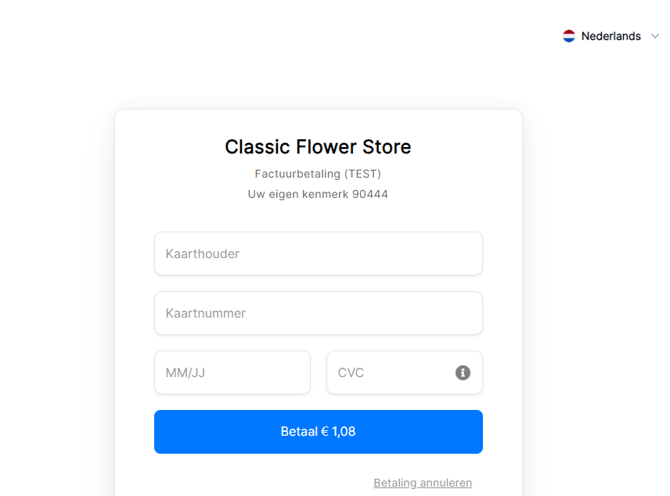
All payment screens are responsive, accept payments in various currencies, and are available in the following languages:
 Dutch
Dutch German
 English
 French
 Italian
 Spanish
 Turkish
 Hungarian
 Norwegian
 Polish
 Croatian
 Portuguese
 Romanian
 Swedish
 Slovak
 Finnish
 Czech
Czech Greek
Greek Japanese
Mastercard and Visa have a combined payment screen and contain the same payment option ID: 706 and 709 (High risk)
4. Client-Side Encryption
If you are using the Business package, have your own implementation, and want to activate Client Side Encryption (CSE), please send an email with the following details:
| Subject | Client Side Encryption Request |
| Merchant code | M-....-.... |
| Total number of credit card transactions (this year) | for example 5,000 |
Merchant code
Navigate to the Admin Panel. Click on the "Merchant" tab. Then click on "Company Details". You can find the Merchant code at the top of the page.
Total credit card transactions
Navigate to the Admin Panel. Click on the "Reports" tab. Then click on "Credit Card". You will find the total number of credit card transactions in the second table on the bottom green line.
Send your activation request to boarding@pay.nl.
Processing application
A boarding agent processes your application based on the total number of processed credit card transactions. Based on that number, you will be classified into a PCI DSS Compliance Level . This level determines which (additional) documents you must submit for approval. You will receive a request to submit these documents once your application has been taken into consideration by a boarding agent.
5. 3D Secure
Fraudulent transactions result in additional costs. With 3D Secure technology, credit card providers offer security for online credit card payments by performing an additional verification of customer identity. Using this verification method, cardholders confirm an online credit card payment with a special code, a password, or a biometric solution such as a fingerprint or facial recognition. 3D Secure is a standard for American Express, Mastercard, and Visa credit cards to enable secure online payments.
SafeKey from American Express
American Express credit cards come standard with SafeKey , an extra security measure that protects both cardholders and online retailers against fraud using 3D Secure technology.
The authentication process via SafeKey starts as soon as the cardholder makes an online purchase. Thanks to the technology, a SafeKey transaction request is sent to the American Express Directory Server (DS), which forwards the request to the card issuer's server. Subsequently, the card issuer employs advanced risk modeling techniques to verify the cardholder's identity. Once the identity has been checked and confirmed, the cardholder is prompted to identify themselves via a one-time verification code (email or SMS).
Mastercard Identity Check
As a retailer or web shop owner, you accept an increasing number of online payments. Therefore, you must ensure that every transaction is secure when paid by credit card. Mastercard uses Mastercard Identity Check for this purpose . This extra security makes online credit card payments safer for your customers and you.
When completing a purchase in your webshop with a Mastercard credit card, the cardholder is asked to verify their identity via the Mastercard app using a fingerprint or biometric solution. Once the online identification is confirmed, the transaction is accepted.
Visa Secure
To enable secure online payments via credit cards, all Visa credit cards come standard with Visa Secure (formerly Verified by Visa).
With Visa Secure, cardholders can pay online in two ways: via an SMS code or by confirming the transaction in the app. Has the cardholder enabled biometrics in the app? Then, using their smartphone with iOS as the operating system, they can complete the payment in the app with a fingerprint or facial recognition. Does the cardholder use a smartphone with Android as the operating system? Then the payment can be completed with a fingerprint.
Would you like to receive more information about online credit card payments with 3D Secure? Please contact your account manager.
LVP exemption
A payment of up to 30 euros may be processed without mandatory SCA. If you choose this option and a chargeback occurs due to fraud, you will be liable for the costs. Naturally, you can contest the chargeback if you have sufficient certainty that the cardholder genuinely made the payment themselves.
Challenge & Frictionless
Authentication can be performed on the challenger or frictionless flow. With Frictionless, data is sent from the browser to the bank in an attempt to mark the payer as 'known'. If sufficient data is available, the bank may decide to confirm the payment without further questions (challenging). If this fails, the challenger flow follows. In most cases, a popup is displayed requesting confirmation in an app or entering a PIN. Naturally, the frictionless flow results in a higher conversion rate.
Force a challenge
Via the optimize setting, you can try to influence how a payment is authorized; the final decision always rests with the issuing bank.
- 01 - Default: Bank determines flow
- 02 - Preference for frictionless: Merchant prefers frictionless
- 03 - Preference for challenge: The Merchant prefers the challenge flow, but if the bank does not offer this, they may fall back on frictionless.
- 04 - Challenge required: If the bank does not offer a challenge, authentication is aborted.
If you sell high-risk products and have many fraud reports or chargebacks from customers who still pay with Frictionless, the mandatory 04-Challenge can offer a solution.
6. Fraud prevention system
When it comes to online payments, credit cards can pose a certain risk. PAY.’s advanced fraud detection and prevention system ensures that the number of fraud cases is kept to a minimum, making safe and fast online payments a matter of course for both the consumer and you.
How does it work?
When a credit card transaction is created, a risk analysis is automatically performed based on a large number of factors. Anomalous transactions are monitored and checked in real time by the Risk department. Based on these factors, an assessment is made as to whether a transaction can proceed.
Because this risk assessment is very precise and involves highly specialized work, PAY. does it for you. This ensures that your transactions are always scrutinized with a keen eye.
Credit card status: VERIFY

If our fraud prevention system flags a credit card transaction as 'high risk', the transaction is assigned the temporary status VERIFY Image: Credit card status: verifiy . Our team of specialists then performs an additional check and may contact the merchant, after which the payment is approved ( PAID ) or rejected ( CANCEL ). Until then, the status in your webshop remains PENDING ; the end user will not notice this.
To ensure the fraud prevention system works as accurately as possible for your transactions, it is important that you send enough data along with your transactions. You can read how in this blog post.
Fraud Prevention
Fraud prevention instructional video: how does the credit card verification process work at PAY?
7. Chargebacks
The burden of proof lies with the entrepreneurs when a consumer or their bank questions a credit card payment. The entrepreneur is then given the opportunity to demonstrate that the consumer personally carried out the transaction and received the products or services.
Naturally, we are happy to assist you with this. If we fail to convince the supplier with the evidence, the transaction amount will be withheld.
The consumer receives a refund and the following chargeback costs are calculated:
A chargeback can be requested by the consumer up to 180 days after the agreement for the delivery of the product or service. In the event of fraud, a longer period may apply.
A chargeback always costs money. Even if you are fully in the right, costs are charged. Therefore, ensure good communication with your customer and good support in the event of any complaints.
Visa NON 3D secure chargeback
Visa charges an additional surcharge of 12 euros per chargeback performed by a cardholder (consumer) within Europe where the payment was not processed via 3Dsecure. If you use an exemption, you should take this into account. These costs do not apply to a frictionless 3Dsecure payment.
Recover costs from the consumer
If a consumer initiates a chargeback without a valid reason, this chargeback will also need to be handled by you. If you include in your general terms and conditions that the buyer is liable for the actual costs in the event of unjustified chargebacks, you can attempt to pass these costs on.
Take your time when handling a chargeback. The information you provide will be used by external parties to form an opinion. Bear in mind that billing the consumer for chargeback costs retroactively may result in a bad review for you (albeit unjustified).
8. Reservation
It is possible to create a credit card reservation. As soon as the customer has successfully completed the payment process, the transaction will receive the status AUTHORIZE and not immediately the status PAID . You then have 14 days to convert this reservation into a payment ( capture ). If you do not take action, the transaction will be automatically canceled ( void ).
By default, reserving credit card payments is set to "not activated". If you are interested in this feature, please contact your account manager.
9. Refund authorization
Visa Mastercard has adjusted the way refunds are processed. Previously, after processing, a refund was usually deposited into the cardholder's credit card balance after a few business days. During this time, the cardholder was usually unaware of the current refund status. They only saw the refund in their balance once it was actually received by the bank.
To provide cardholders with insight into the current refund status of their account, an authorization (reservation) is placed on the balance upon a refund, just as they are accustomed to with a credit card purchase. As long as this reservation is visible, the consumer knows that your refund has not yet been received by the bank.
This reservation, which contains the same amount as the refund, is shown as an AF in the credit card balance. You may receive questions about this. You can reassure the cardholder that this authorization disappears automatically as soon as the refund has been credited to the credit card balance.
In general, a Merchant (as described in the rules of the card schemes) must process refunds to the original payment option. Only in exceptional situations should the Merchant process an external refund, as this is very risky.
10. Images
If you want to display the credit card logo on your page, you can use the images below.
| 40x26 | 50x32 | 20x20 | 25x25 | 50x50 | 75x75 | 100x100 |
|---|---|---|---|---|---|---|
 |
 |
 |
 |
 |
 |
 |
Replace dimensions in the above URL with one of the available dimensions.
11. Payment
Credit card payments are received via Stichting Pay.nl from the various credit card acquirers and are paid out to you through regular clearing. In most cases, it is not necessary to create an additional account or enter into an agreement. However, if you obtain more than €1,000,000 per credit card company per year, we are required to draw up additional agreements for you.
12. American Express
| Facts | |
|---|---|
| Category | Card payments |
| Market | Worldwide, higher segment consumers |
| Share | In the Netherlands, 15% of revenue is generated via credit cards. |
| Currency | All |
| Payment | Not guaranteed, chargeback is possible |
| Refund | One refund per transaction possible up to 100% of the order amount |
| Clearing | Full service (payment and invoicing via PAY.) |
| Status |  Active Active |
| Expiration date | 4 hours |
| Payment option ID | 1705 |
| Package | Available in the Pioneer , Professional , Business , and Corporate packages. |
| Surcharging | Allowed |
American Express (AMEX) is one of the three largest credit card companies in the world. As a result, it is a widely used payment option both online and offline.
Every American Express card is equipped with the additional security measure "Safe Key" by default. Cardholders can only make payments using this security check if the bank or card issuer actually adds the specific service to the card. In some cases, when making a payment with American Express, you may be asked to enter additional information in addition to your card details. In most cases, this involves a few digits of the code on the back of the card or an additional password.
Activate American Express (AMEX)
-
In the Admin Panel, go to the Merchant tab » Company details https://admin.pay.nl/my_merchant .
-
You will find the Package field in the agreement .
-
Click on "Change package options" and click on the Professional (S), Business (M) or Corporate (L) package at the top.
-
If you scroll to the package options for the Professional (S) package, you will see the option "Credit cards" Image: Activating credit cards .
-
Select the "Credit cards" option and then click the "Add" button.
Images
If you want to display the American Express logo on your page, you can use the images below.
| PNG icoon | SVG icoon |
|---|---|
 |
 |
13. Mastercard
| Facts | |
|---|---|
| Category | Card payments |
| Market | Worldwide |
| Share | 960 million cardholders |
| Currency | All |
| Payment | Not guaranteed, chargeback is possible |
| Refund | Multiple refunds per transaction possible up to 100% of the order amount |
| Clearing | via PAY. |
| Status | Active |
| Expiration date | 4 hours |
| Payment option ID | 706 and 709 (High risk) |
| Package | Available in the Pioneer , Professional , Business , and Corporate packages. |
| Surcharging | Not allowed |
Mastercard is the world's second-largest credit card provider. Only VISA has a larger market share, with 1.3 billion cardholders. Together, these two credit card companies cover 95% of the international market and are therefore indispensable payment methods if you offer your products outside the Netherlands.
Mastercard transactions are processed in 95% of cases based on the extra security check "Mastercard SecureCode". This is a 3D Secure technology that ensures an additional security check is performed during the transaction process.
Images
If you want to display the Mastercard logo on your page, you can use the images below.
| PNG icoon | SVG icoon |
|---|---|
 |
 |
Company logo
Mastercard advises merchants to upload their company logo via this link on the Mastercard logo microsite.
Issuers (card-issuing banks) can download these logos and display them in their online banking apps. Ultimately, this can prevent chargebacks resulting from cardholders not recognizing their transaction(s) in their payment overview.
Mastercard Monitoring Programs
Mastercard has multiple programs to review merchants. It assesses fraud rates (Sales2Fraud) and (Chargeback2TRX) ratios in its own way. This review method differs from the review methods of VISA or AMEX and from PAY's Fair Use policy; each party employs its own procedures.
-
Fraud and chargeback ratios are calculated based on the volume of a month against the fraud and chargebacks reported in the following month.
-
Thresholds are determined upon hitting both the ratio and the number (in the case of chargebacks) or the effective volume (in the case of fraud).
-
Programs start as soon as the thresholds are exceeded in a calendar month.
Excessive Chargeback Merchant (ECM)
Takes effect after you have exceeded the chargeback limit.
-
From 100 Chargebacks and 1.5% chargeback to sales ratio
Read all about Mastercard programs at https://www.mastercard.us/en-us/about-mastercard/what-we-do/rules.html
High Excessive Chargeback Merchant (HECM)
Takes effect after you have exceeded the chargeback limit:
- From 300 Chargebacks and 3% chargeback to sales ratio
Excessive Fraud Merchant (EFM)
The following criteria apply:
- At least 1,000 e-commerce transactions
- At least $50,000 in monthly net fraud turnover reported
- At least 0.50% monthly fraud rate
- 3D Secure and/or data-only transactions account for less than 50% of the total card-not-present volume.
Mastercard calculates this on a monthly basis. If you make 1,001 transactions of which 100 are flagged as fraud and you perform more than 50% without 3D Secure (due to your preferences, Merchant Initiated or Customer Initiated).
If you exceed the Mastercard limits, the PAY. Fair Use policy is often also violated.
Mastercard Extended Requirements for Adult Content
| Acquirer | Document |
|---|---|
| Mastercard | Mastercard - Adult Content and Services Merchant Requirements |
| BS Payone | BS Payone - Extended Requirements Adult Content Merchants |
14. Carte Bleue
| Facts | |
|---|---|
| Category | Card payments |
| Market | France |
| Share | 60 million cardholders |
| Currency | Euro |
| Payment | Not guaranteed, chargeback is possible |
| Refund | One refund per transaction possible up to 100% of the order amount |
| Clearing | via PAY. |
| Status | Active |
| Expiration date | 4 hours |
| Payment option ID | 710 and 711 (High risk) |
| Package | Available in the Pioneer , Professional , Business , and Corporate packages. |
| Surcharging | Not allowed |
In France, Carte Bleue is one of the most widely used online payment methods, with over 60 million cardholders. Half of these cards are compatible with online payments thanks to VISA support. All Carte Bleue cards "by VISA" can process payments directly in your webshop via the PAY. payment system. With this enormous reach, this payment method is indispensable for the e-commerce entrepreneur doing business in France.
In many cases, Carte Bleue transactions are processed based on the additional security check "Verified By VISA". This is a 3D Secure verification that ensures an extra security check is performed during the transaction process.
Unlike the other payment methods, credit cards are not immediately available. Your webshop must first be approved by our credit card acquirer. After approval, you will receive a notification from us and can accept payments via Carte Bleue. Please allow 1-2 weeks for your credit card connection to become active.
Images
If you would like to display the Carte Bleue logo on your page, you can use the images below.
| PNG icoon | SVG icoon |
|---|---|
 |
 |
15. Visa
| Facts | |
|---|---|
| Category | Card payments |
| Market | Worldwide |
| Share | 1.3 billion cardholders |
| Currency | All |
| Payment | Not guaranteed, chargeback is possible |
| Refund | Multiple refunds per transaction possible up to 100% of the order amount |
| Clearing | via PAY. |
| Status | Active |
| Expiration date | 4 hours |
| Payment option ID | 706 and 709 (High risk) |
| Package | Available in the Pioneer , Professional , Business , and Corporate packages. |
| Surcharging | Not allowed |
Visa is the world's largest credit card provider and is therefore a widely used payment option, both online and offline. In Europe alone, Visa has nearly 250 million cardholders. Just like with other credit card companies, consumers can use Visa to purchase something via your webshop and pay for it later. The amount is not debited from the account immediately, but is invoiced to the consumer later by the card issuer.
Visa transactions are processed in 95% of cases based on the extra security check "Verified By Visa", a 3D Secure technology that ensures an additional security check is performed in the transaction process.
Images
If you want to display the Visa logo on your page, you can use the images below.
| PNG icoon | SVG icoon |
|---|---|
 |
 |
Visa Monitoring Programs
Visa has introduced a new monitoring program since April 1, 2025, the so-called Visa Acquirer Monitoring Program (VAMP). This has replaced the old VFMP and VDMP. The VAMP will be updated again and fully implemented as of April 1, 2026.
The VAMP monitors both the overall Acquirer portfolio and Merchants individually. The VAMP ratios are calculated using a new transaction volume-based metric that combines Card Not Present (CNP), TC 40 fraud, and all variants of disputes. Additionally, a new criterion has been added that monitors fraudulent payment attempts relative to total traffic, the so-called 'Enumeration Ratio'.
The limit values and effective dates are listed below:
| VAMP | Acquirer Portfolio | Merchant | |||
|---|---|---|---|---|---|
| Early Warning | Above Standard | Excessive | Excessive1 | Excessive2 | |
| VAMP Ratio | VAMP Ratio | VAMP Ratio | VAMP Ratio | Enumeration Ratio | |
| Limit values - effective 1 Jun '25 | >=40bps to < 50bps | >=50bps to < 70bps | >= 70bps | >= 220bps | >= 2,000bps |
| Limit values - effective 1 Apr '26 | >=40bps to < 50bps | >=50bps to < 70bps | >= 70bps | >= 150bps | >= 2,000bps |
Terminology: 1 bps equals 0.01% of processed traffic. Therefore, for VAMP Ratios, 50 bps equals 0.5% fraud- and/or dispute-related traffic.
1. Merchant Excessive ratios are assessed when the Acquirer VAMP Ratio < 40bps. If the Acquirer VAMP ratio is Above standard or Excessive, all Merchants with a VAMP Ratio of >= 50bps and a VAMP count of >= 5 are flagged.
2 At least 300,000 monthly enumerated transactions, identified by Visa's VAAI model.
Additional criteria:
-
Regarding CNP domestic and cross-border VisaNet transactions.
o The minimum number of TC 40 fraud and disputes is 1,500. This applies to both Acquirer and Merchant.
-
VAMP excludes Rapid Dispute Resolution (RDR) from the calculation. TC40 fraud related to cases handled by RDR is not excluded and affects the VAMP ratio.
-
VAMP excludes confirmed 'Compelling Evidence 3.0' from the calculation.
Acquirers classified as Above Standard or Excessive based on the VAMP Ratios may incur fines. These fines are avoidable and have been developed to maintain responsible fraud and dispute management.
Visa applies an advisory period for Acquirers commencing April 1, 2025, through September 30, 2025. Visa advises Acquirers to take action and implement measures for the go-live by October 1, 2025. No penalties will be imposed during the advisory period.
Acquirers and Merchants who receive the first comments within a continuous period of 12 months will receive a 3-month exemption to improve service percentages.
After this exemption period, new comments may result in fines.
-
Acquirers with a portfolio above the relevant thresholds will receive a penalty for each Merchant with a VAMP Ratio of >= 50bps, where the VAMP count is >= 5.
-
When Merchants' service percentages exceed the relevant thresholds, they receive fines only for their own fraud and dispute transactions.
| Fines 3 | ||
| Acquirer Portfolio4 | Merchant | |
| Above standard5 | Excessive6 | Excessive5 |
| $4 per CNP TC 40 fraud and dispute | $8 per CNP TC 40 fraud and dispute | $8 per CNP TC 40 fraud and dispute |
3 Current penalty amounts may be subject to price changes per Visa's Fee Schedule.
4 Fines for the Acquirer are based on all Merchants with a VAMP Ratio of >= 50bps and a VAMP count of >= 5.
5 Go-live as of June 1, 2025 for Acquirers and Merchants designated as Above Standard.
6 Go-live as of June 1, 2025 for Acquirers and Merchants classified as Excessive.
If a Merchant exceeds the 50bps limit, PAY.'s Fair Use Policy may also be violated. Merchants with ratios that are too high harm Pay.'s reputation and Acquirer Portfolio. If Pay. is fined for exceeding the Acquirer Portfolio limits, Pay. will charge Merchants with >= 50bps a fine resulting from the Fair Use Policy calculation.
16. Postepay
| Facts | |
|---|---|
| Category | Card payments |
| Market | Italy |
| Share | 8.8 million cardholders |
| Currency | Euro |
| Payment | Not guaranteed, chargeback is possible |
| Refund | One refund per transaction possible up to 100% of the order amount |
| Clearing | via PAY. |
| Status | Active |
| Expiration date | 4 hours |
| Payment option ID | 707 and 708 (High risk) |
| Package | Available in the Pioneer , Professional , Business , and Corporate packages. |
| Surcharging | Not allowed |
The Postepay credit card originated from a large Italian mail-order company. With the rise of e-commerce and the lack of a simple payment method for Italy, this organization seized its opportunity. As a result, Postepay quickly grew into one of the most popular national payment methods in Italy.
Any Italian can purchase a Postepay payment card via the website and post offices. A bank account is not required for this, as the user can top up the card. During the payment process, an additional security check is performed using 3D Secure technology.
Unlike the other payment methods, credit cards are not immediately available. Your webshop must first be approved by our credit card acquirer. After approval, you will receive a notification from us and can accept payments via Postepay. Please allow 1-2 weeks for your credit card connection to become active.
Images
If you would like to display the Postepay logo on your page, you can use the images below.
| PNG icoon | SVG icoon |
|---|---|
 |
 |
17. Nexi
| Facts | |
|---|---|
| Category | Card payments |
| Market | Italy |
| Share | 53% |
| Currency | Euro |
| Payment | Not guaranteed, chargeback is possible |
| Refund | One refund per transaction possible up to 100% of the order amount |
| Clearing | via PAY. |
| Status | Active |
| Expiration date | 4 hours |
| Payment option ID | 1945 and 1948 (High risk) |
| Package | Available in the Pioneer , Professional , Business , and Corporate packages. |
| Surcharging | Not allowed |
When targeting the Italian market, Nexi is an indispensable payment option. 53% of credit card payments in Italy are made using this card.
Unlike the other payment methods, credit cards are not immediately available. Your webshop must first be approved by our credit card acquirer. After approval, you will receive a notification from us and can accept payments via Nexi. Please allow 1-2 weeks for your credit card connection to become active.
Images
If you want to display the Nexi logo on your page, you can use the images below.
| PNG icoon | SVG icoon |
|---|---|
 |
 |
18. Dankort
| Facts | |
|---|---|
| Category | Card payments |
| Market | Denmark |
| Share | 5.6 million cardholders |
| Currency | Euro |
| Payment | Not guaranteed, chargeback is possible |
| Refund | One refund per transaction possible up to 100% of the order amount |
| Clearing | via PAY. |
| Status | Active |
| Expiration date | 4 hours |
| Payment option ID | 1939 and 1942 (High risk) |
| Package | Available in the Pioneer , Professional , Business , and Corporate packages. |
| Surcharging | Not allowed |
Dankort is the national payment card of Denmark. More than 80% of the Danish population (5.6 million cardholders) has access to this payment card. This makes Dankort an indispensable payment option when targeting the Danish market.
Unlike the other payment methods, credit cards are not immediately available. Your webshop must first be approved by our credit card acquirer. After approval, you will receive a notification from us, and only then can you accept payments via Dankort in your webshop. Please allow 1-2 weeks for your credit card connection to become active.
Images
If you would like to display the Dankort logo on your page, you can use the images below.
| PNG icoon | SVG icoon |
|---|---|
 |
 |
19. Error codes
As a rule, code 00 is returned for a successful transaction. There are various error codes. 05 is the most common error code. See the table below for a complete overview:
| Code | Description |
|---|---|
| 01 | Declined - Call issuer |
| 04 | Declined - Pick up card |
| 05 | Declined - Do not honor |
| 10 | Declined - Partial approval |
| 12 | Declined - Invalid transaction |
| 13 | Declined - Card amount invalid |
| 14 | Declined - Card number is invalid |
| 15 | Declined - No such issuer |
| 19 | Declined - Re-enter |
| 51 | Declined - Insufficient funds |
| 54 | Declined - Card expired |
| 57 | Declined - Service not allowed |
| 61 | Declined - Customer exceeds withdrawal limit |
| 62 | Declined - Restricted SIC code |
| 63 | Declined - Restricted |
| 65 | Declined - Customer exceeds activity limit |
| 78 | Declined - No accounts |
| 97 | Declined - CVV mismatch |
20. Click to Pay
| Facts | |
|---|---|
| Category | Card payments |
| Market | Worldwide |
| Share | Available via Visa and Mastercard networks |
| Currency | All |
| Payment | Not guaranteed, chargeback is possible |
| Refund | One refund per transaction possible up to 100% of the order amount |
| Clearing | via PAY. |
| Status | Active |
| Expiration date | 4 hours |
| Payment option ID | 706 and 709 |
| Package | Available in the Professional , Business , and Corporate packages |
| Surcharging | Not allowed |
Click to Pay is the international standard for secure and fast online payments with a credit card, based on the EMV Secure Remote Commerce (SRC) standard. The solution was developed by the major card networks — Visa, Mastercard, and American Express — and replaces the traditional guest checkout where cardholders must re-enter their card details with every purchase.
With Click to Pay, the consumer only needs to save their card details once. For a subsequent purchase at a participating webshop, the system automatically recognizes the cardholder based on their email address. The cardholder then selects the desired card with a single click and completes the payment — without having to retype any card details.
Benefit for merchants: Click to Pay uses network token technology. This means that no card details are exchanged during the transaction, which limits the PCI-DSS scope for merchants and reduces the risk of fraud.
How does the payment process work?
-
The consumer selects Click to Pay as the payment method on the PAY hosted payment page.
-
The system recognizes the consumer based on their email address.
-
The consumer selects the desired card from his saved cards.
-
The identity is confirmed via an OTP (SMS/email) or automatically via the frictionless flow if the consumer has chosen to skip verification.
-
The payment is processed via the underlying card network (Visa, Mastercard)
How does the payment process work?
Click to Pay is fully integrated with 3D Secure (EMV 3DS) by default. Every transaction goes through the standard authentication process of the relevant card network:
- Visa: Visa Secure
- Mastercard: Mastercard Identity Check
Because transactions are processed via network tokens instead of card numbers, they are assessed as lower risk by issuers. In practice, this leads to a higher frictionless rate and, consequently, better conversion.
Regulations & activation
Click to Pay is available to merchants who are already connected to Visa and/or Mastercard via PAY. No separate onboarding procedure is required. Contact your account manager to activate Click to Pay for your sales location.
Important: Click to Pay transactions are processed as regular card payments via the underlying network. The existing PCI-DSS, chargeback, and fraud prevention rules as described in sections 2 through 8 apply.