
With Klarna via Pay., you can offer your customers a flexible and user-friendly payment experience. Depending on the country and the available payment options, customers can pay immediately, pay later or spread the purchase amount over several instalments.
Facts
| Category | Buy now, pay later |
|---|---|
| Markets | The Netherlands, Belgium Germany, Austria, Switzerland Denmark, Finland, Norway, Sweden United Kingdom, Ireland Spain, Italy, France, Portugal Czech Republic, Poland, Romania, Slovakia, Greece |
| Currency | Local currency |
| Payment | If accepted by Klarna, payment is guaranteed |
| Limit | Klarna does not impose a maximum order value |
| Refunds | Multiple refunds per transaction are possible, up to 100% of the order amount plus €30 |
| Clearing | Via Pay. |
| Payout time | Between 5 and 21 days |
| Status | Active |
| Expiry time | 4 hours |
| Payment option ID | 1717 |
| Package | Available with the Professional, Business and Corporate packages |
| Surcharging | Permitted, but the surcharge may never exceed the actual transaction costs |
Different payment options
Klarna offers three payment options in the Netherlands:
- Pay now
The customer pays the full amount immediately. - Pay later
The customer pays the full amount within 30 days. - Pay in 3 instalments
The purchase amount is split into three payments:- the first instalment is paid immediately;
- the second instalment is paid after 30 days;
- the third instalment is paid after 60 days.
The options shown to the customer depend on factors such as the country, the purchase amount and Klarna’s assessment of the customer.
The merchant therefore does not determine whether an individual customer is approved for deferred or instalment payments.
Credit check
For Pay later, Pay in 3 instalments and payments by direct debit, Klarna performs a credit check.
Klarna determines a customer’s creditworthiness through an automated assessment that is carried out again for every purchase. Approval for a previous purchase therefore does not guarantee approval for a subsequent order.
No credit check is performed when the customer uses Pay now by bank transfer or credit card.
Activation
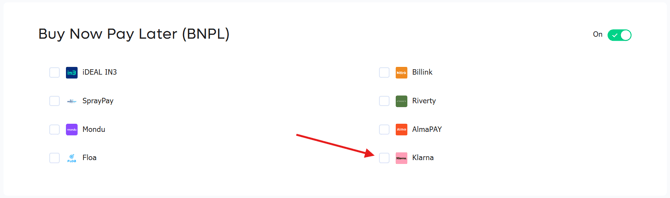
To accept Klarna payments in your webshop, enable Klarna for your sales location. This will start the onboarding process.
Extra Merchant Data
In some cases, Klarna requires additional information about the end customer and the purchase to carry out an accurate risk assessment. You can use the following settings to determine which customer and order data is shared with Klarna:
- NONE: No customer data is shared.
- SIMPLE: If
customerTrust < 0, we indicate that the customer has successfully completed a previous payment. - FULL: Based on the
customerReference, we check whether the customer has successfully completed previous payments. This data is then grouped and shared with Klarna. - FULL EXTENDED: The same as FULL, but we also identify related payments based on the customer’s email address and delivery address.
Once onboarding has been completed, you will receive a notification. You will also receive an email invitation to the Klarna portal. From the Klarna portal, you can manage disputes and customise the look and feel of the payment screen, among other things.
Capturing (approving) or voiding (declining) transactions
When a transaction is approved by Klarna’s credit check, its status changes to AUTHORIZE. Klarna no longer permits transactions to be captured automatically by default. This means that every transaction with the AUTHORIZE status must be captured manually through the Pay. Dashboard or automatically through your integration before its status changes to PAID.
Instructions for configuring this in your integration are available in our Developer documentation.
If you use a Pay. plugin for an e-commerce platform, follow the steps in the “Capture (BNPL)” section of our Developer documentation for your plugin.
- Capture = approve the transaction. Klarna will begin invoicing the customer.
- Void = decline the transaction. The transaction will be cancelled and Klarna will not send an invoice to the customer.
If you neither capture nor void an order, it will automatically expire after 28 days. You will not receive the funds, even if the goods have already been delivered.
We recommend configuring and testing this process thoroughly before making Klarna available to customers, if necessary in cooperation with your web developer.
Dispute management
Once onboarding has been completed, you will receive an invitation to the Klarna portal, where you can create an account and log in.
If a customer opens a dispute, Klarna will notify you. The entire dispute process is managed through the Klarna portal and falls outside Pay.’s scope of management.
Logo's
If you would like to display the Klarna logo on your website, download it from Klarna’s documentation.
Images
With Klarna, it is possible to include both a product URL and an image URL as part of the product information. These URLs can be used to identify the product and its corresponding image.
Product URL
The product URL is the publicly accessible URL of the specific product page on the merchant’s website.
The URL should link directly to the relevant product and must be accessible without authentication or an active customer session.
Example:
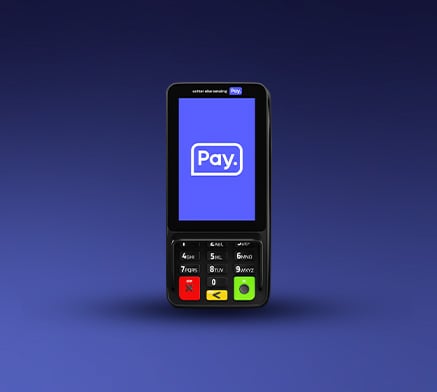
https://shop.pay.nl/products/pax-a35-terminal
Image URL
The image URL is the publicly accessible URL of the image of the relevant product.
This URL should link directly to the image file rather than to the product page. The image must also be accessible without authentication or an active customer session.
Example:
https://shop.pay.nl/cdn/shop/files/A35_V3_1.jpg
Request example
An example of a request including the product and image URLs can be found in our Developer documentation.